
Weekly dose of ServiceNow features in Washington DC release - Week 3 - updateWithReferences()
What does it do:
Think of a case where you are working on a scoped application which is having a main request and some associated tasks. Now whenever you make some changes in your task for e.g. comments, you want those comments to be copied to your main request. In this case we don't have to do an additional GlideRecord query for our referenced record, instead we can use the above method and update the fields as required.
This makes our code efficient and reduce the code time to make those changes.
Note: There is an optional parameter to this method. Parameter type is string, there can be possibly an error with the doc site where it displays the type as an Object. However, the usage of this parameter is good. You can describe the reason of the update in this parameter and that will be stored in the sys_audit table in 'reason' field. This can be a good way to remember why this update was made. Thanks to @Kieran Anson for explaining this parameter to me.
I do not have a scoped app handy so I am going to run a script in global scope and show how this method works, however, I will update the article with an example of scoped app script once I am done with a new scoped app I am working on.
Below script runs in global scope and either create or update or both for the assignment group referenced in the incident form. If the assignment group field is empty, then it will create a new record based on the information passed and add it on the incident record. If the assignment group exists, then it will just update it.
var inc = new GlideRecord('incident');
inc.get("e968434893600210a1ccfa497bba1001"); // sys_id of incident record
inc.assignment_group.name='Test with updatewithReference'; // here assignment group field is empty, so it will create a new group and update the incident with same.
inc.assignment_group.description = 'This group is created with updateWithReferences method';
inc.updateWithReferences("Lets see if the assignment group gets created");
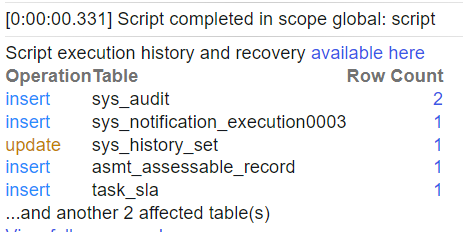
Output:


As we have passed the value in the parameter of the method, we can see the reason field getting updated in the audit record.

You can find the official documentation here.
Please mark this as helpful if you think it has helped you.
Regards,
Mohit Kaushik
2XServiceNow MVP (2023-2024)
Labels:
https://www.servicenow.com/community/developer-blog/weekly-dose-of-servicenow-features-in-washington-dc-release-week/ba-p/2968930