
Introducing Value-at-a-Click for Impact Guided customers
ServiceNow Impact helps you achieve more value faster from your ServiceNow investment. One of the most important ways it does this is with your Value Journey, which provides a proven, structured framework for tracking and articulating value.
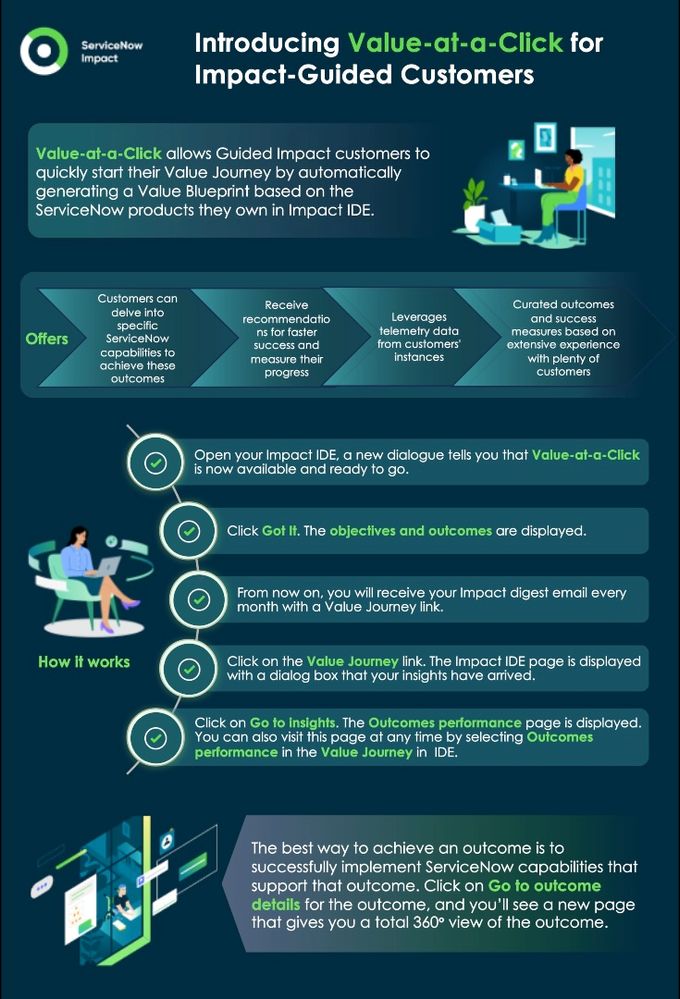
Value-at-a-Click allows Guided Impact customers to quickly start their Value Journey by automatically generating a Value Blueprint based on the ServiceNow products they own. This feature produces business objectives and outcomes, displayed directly in the Impact IDE. Customers can then delve into specific ServiceNow capabilities to achieve these outcomes, receive recommendations for faster success, and measure their progress. Value-at-a-Click leverages telemetry data from customers' instances, providing curated outcomes and success measures based on extensive experience with thousands of customers. It offers a self-service experience that requires minimal effort and delivers immediate insights, initially focusing on Impact accelerators with plans to expand recommendations over time.
Let’s take a deeper look at how Value-at-a-Click works.
The first thing you’ll see when you open up your Impact IDE is a new dialogue that tells you that Value-at-a-Click is now available and ready to go. Currently, it supports ITSM, ITOM, and HR, but we’re looking to add more ServiceNow products in future.

Click “Got It” and you’ll see your objectives and outcomes, as shown below. These are carefully curated based on ServiceNow’s experience across thousands of customers and the value that they have achieved. This saves you time and effort, because previously you would have had to set these up using the Value Blueprint (don’t worry, if you’ve already set your objectives and outcomes using the Value Blueprint, we won’t overwrite these).

In this example, one of the business objectives is to “Increase IT employee productivity”. Right next to the objective, there is a set of operational outcomes that will help you achieve this objective. For example, one of these outcomes is “Reduce disruption from incidents”. Each outcome also shows you which product will let you achieve that outcome, along with a success metric that is used to measure that outcome.
Note that you can return to the screen at any time simply by selecting “Objectives and outcomes” from the “Value Journey” dropdown menu in the IDE.
Now, every month when you receive your Impact digest email, you’ll see a “Value Journey” link.

Click on the link, and you’ll go straight to your Impact IDE and see a dialog box telling you that your insights have arrived.

Click on “Go to insights”, and you will go straight to the “Outcomes performance” page. You can also visit this page at any time by selecting “Outcomes performance” in the “Value Journey” dropdown menu in the IDE.

This shows you a scrolling list of all the operational outcomes that were set up for you in the “Objectives and outcomes” page we talked about earlier. The first thing you will see is how that outcome is performing, including how the success metric is trending over time, as well as how you’re doing compared to your industry peers. This gives you a readout on where you are with the outcome and the progress you’re making. Each outcome also gives you recommendations on accelerators that can help you achieve that outcome faster.
Of course, the best way to achieve an outcome is to successfully implement ServiceNow capabilities that support that outcome. Value-at-a-click lets you easily identify the related capabilities as well. Simply click on “Go to outcome details” for the outcome, and you’ll see a new page that gives you a total 360° view of the outcome, as shown below.

This page contains everything that was on the “Outcomes performance” page, along with more information about the outcome and a list of related capabilities. It also shows you the status of each related capability—for instance, whether you’re currently using it or not. If you’re already using the Impact Capabilities Map, this is the same status that is shown in that map.
In the example above, we can see that the core Incident Management capability for this objective is already implemented, but one of the value-enhancing capabilities—Virtual Agent—currently isn’t in use. By implementing Virtual Agent, you can improve this outcome. But of course, before you decide to implement, you’ll want to find out more. Simply click on the Virtual Agent capability and you’ll get more information, including a description of the capability and links to resources such as product documentation.

Having investigated further, you decide to implement Virtual Agent. You also notice that there is a Jumpstart Your Virtual Agent recommendation on the page. This is an Impact Accelerator that gets you started quickly with Virtual Agent, which is why it was automatically recommended.

Click on the recommendation, and you will see more information about the Accelerator. You can also start the Accelerator by clicking on the button at the bottom of the Accelerator information fly-in.

Of course, there can be multiple activities such as Accelerators for a specific outcome, such as the “Reduce disruption from incidents” outcome we’ve been looking at.
And there you have it. Value-at-a-Click!

https://www.servicenow.com/community/servicenow-impact-articles/introducing-value-at-a-click-for-impact-guided-customers/ta-p/2958752