
111. Script Debugger
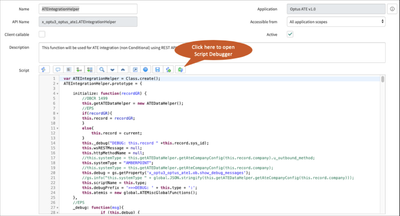
There is a pretty cool and useful utility in ServiceNow called Script Debugger which enables users with the script_debugger (or admin) role to debug (e.g. pause ) any server-side script that runs in an interactive transaction such as business rules, script includes, script actions, or UI actions that require a response to proceed.
Note: Some script objects, such as script includes, can be called from multiple contexts. For example:
- when a business rule runs a script include on a form submit that is an interactive transaction waiting on the form data to change before continuing.
- when a scheduled job runs the same script include that is a non-interactive background transaction that can also run other scripts simultaneously.
To use Script Debugger, follow the following steps:
- Open any ‘Server Side’ script (e.g. Business Rule, Script Include, etc).
Form the Syntax Editor Toolbar, click the Open Script Debugger Icon
This will open the Script Debugger Window, repeat steps 1–3 if you need to debug multiple scripts
Add your Breakpoints by clicking on the gutter next to the script line
Once done, you may start the debugging session by triggering the script (e.g. Create/Update a Record) which will open a new window
The Script Debugger pauses the script on the first line containing a breakpoint.
https://medium.com/@LearnITbyPrashant/111-script-debugger-9ba4b1ce23b8?source=rss-d005fc598f0a------2