
85. Steps for loading Data in the ServiceNow System
- Search Load Data in Filter Navigator, hit enter and then it will open to upload Excel file to create template. Sample Data added and load data.
2. Click Submit. Check Import set is created and link is provided to create transform map, as soon as link is clicked we can create transform map, therefore we will enter all the appropriate details.
3. Click Submit and do Mapping Assist.
4. As soon as mapping is done we will get redirected to previous data loaded page.
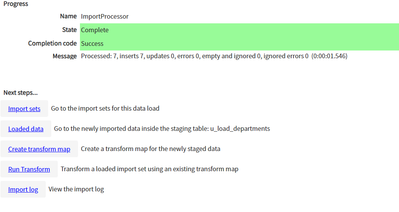
5. We are able to see Run Transform link now, we can click on this transform to map the data. Click on Transform.
6. After Transform is completed. Success message is generated.
7. Data is loaded as per the excel file I have used.
8. Excel I have loaded is, and matching the data which is loaded into servicenow.
https://medium.com/@LearnITbyPrashant/85-steps-for-loading-data-in-the-servicenow-system-daab01597663?source=rss-d005fc598f0a------2