
67. Hide Interaction in Service Operations Workspace
Import
·
Jun 02, 2024
·
article
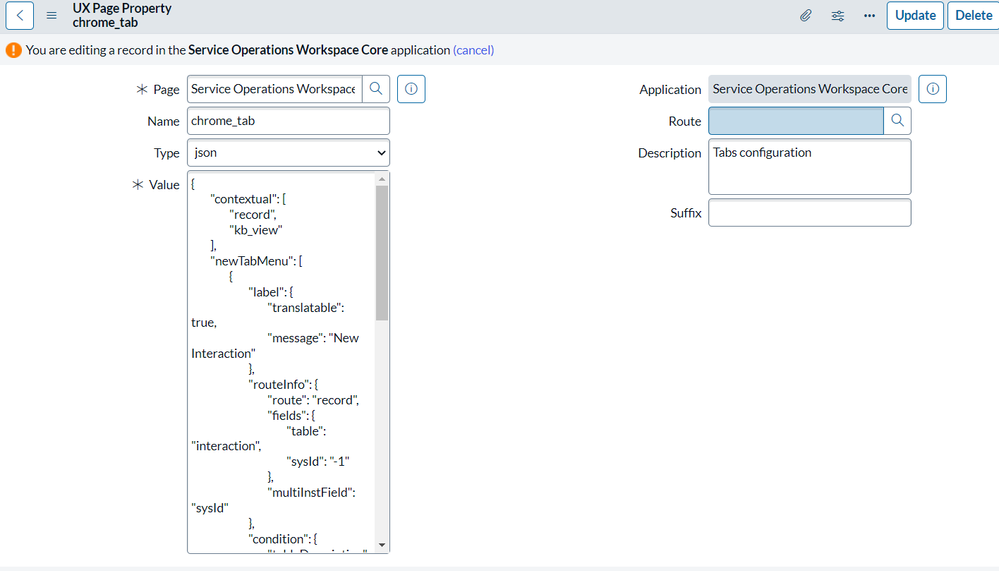
If you want to know, how to hide ‘New Interaction’ in Service Operation Workspace.
Follow the below steps
- Navigate to All > Now Experience Framework > Experiences.
- From the list of UX applications, select Service Operations Workspace.
- On the UX Application form, from the UX Page Properties related list, select the chrome_tab property.
- On the UX Page Property page, when the Type field is set to json, edit the Value field, for example, to add or delete routes or tables.
- Click Update.
View original source
https://medium.com/@LearnITbyPrashant/68-hide-interaction-in-service-operations-workspace-9841be736d63?source=rss-d005fc598f0a------2