
Install and configure Knowledge Generation for Now Assist for ITSM in 5 minutes (or less!)
Import
·
May 31, 2024
·
article
Required Applications, Plugins, and Versions
- Washington DC Patch 3 (or above)
- Now Assist for ITSM version 4.0.1 (or above)
- Service Operations Workspace (version 5.0.0 or above)
Install and configure Knowledge Generation
- Install the Now Assist for ITSM plugin and activate Now Assist Panel
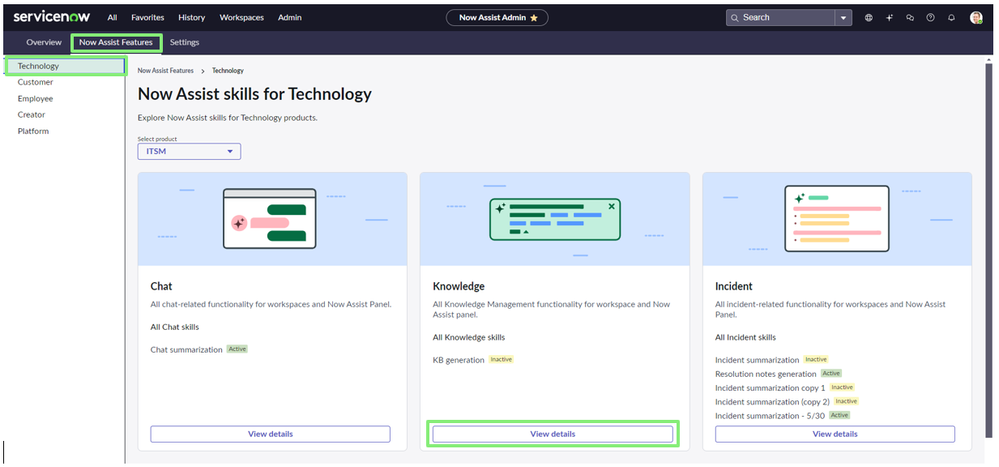
- Navigate to Now Assist Admin > Home
- Select Now Assist Features, then select the Technology tab, and then select view details under Knowledge Generation card.
- Select Activate skill under ***Knowledge Generation
*
- Choose input data screen appears (nothing can be edited here). Select ‘Save and continue’
- In ‘Define Availability’, select the criteria that need to be satisfied in order for the Knowledge Generation capability to be available, or select ‘Skill always available’. Then click ***‘Save and Continue’
*
- In ‘Select display’, there are options to display in-product and/or in Now Assist panel. Toggle the 'Display in-product' and/or the '***Now Assist panel'. In the ‘Select roles for whom kb generation will be displayed’ field, input the roles that need access to the skill. Then click *‘Save and continue’
- Knowledge Generation is now ready to use


View original source
https://www.servicenow.com/community/itsm-articles/install-and-configure-knowledge-generation-for-now-assist-for/ta-p/2949753