
ServiceNow Things to Know 131: Change the Homepage & Text of the Now Mobile App
 PrashantLearnIT
Hello Everyone,
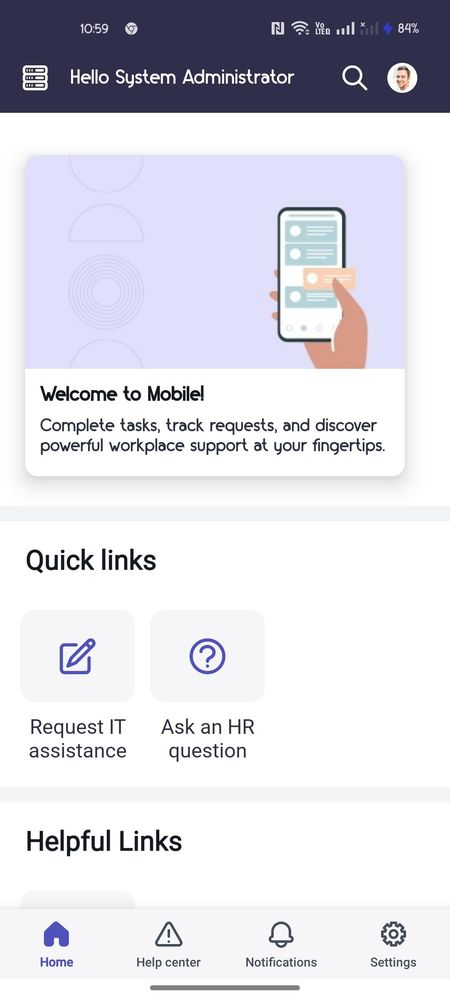
Currently, My Mobile App Looks like below: —

Steps to Change Image and Text
Step 1 — Redirect to Static Media Section using sn_me_static_media_section.list
and open the record.


Step 2 — Update the Title, Image, and Text to update it.

Step 3 — Verify the change that was applied to the Now Mobile App.

If my content helped you in anyway, please mark this content as BOOKMARK, SUBSCRIBE & HELPFUL
Best Regards,
Prashant Kumar (LearnIT)
YouTube Channel LearnIT: https://www.youtube.com/@learnitwithprashant
Blog LearnIT: https://medium.com/@LearnITbyPrashant
Prashant Kumar LinkedIn: https://www.linkedin.com/in/learnitbyprashant/
ServiceNow Community Prashant Kumar - https://www.servicenow.com/community/user/viewprofilepage/user-id/19635
https://www.servicenow.com/community/developer-blog/servicenow-things-to-know-131-change-the-homepage-amp-text-of/ba-p/2943844