
Set different “From” and “Reply To” emails for the Native and Flow designer Emails/Notifications.
Hi Community,
Sometimes we get requirement to use different "From" and "Reply To" addresses for certain notifications/emails that ServiceNow sends out. (Since you can't add logic to set different address on the SMTP Account)
This article shows how to do this, Including emails sent by flow designer's "Send Email" action.
1)Native Notifications:
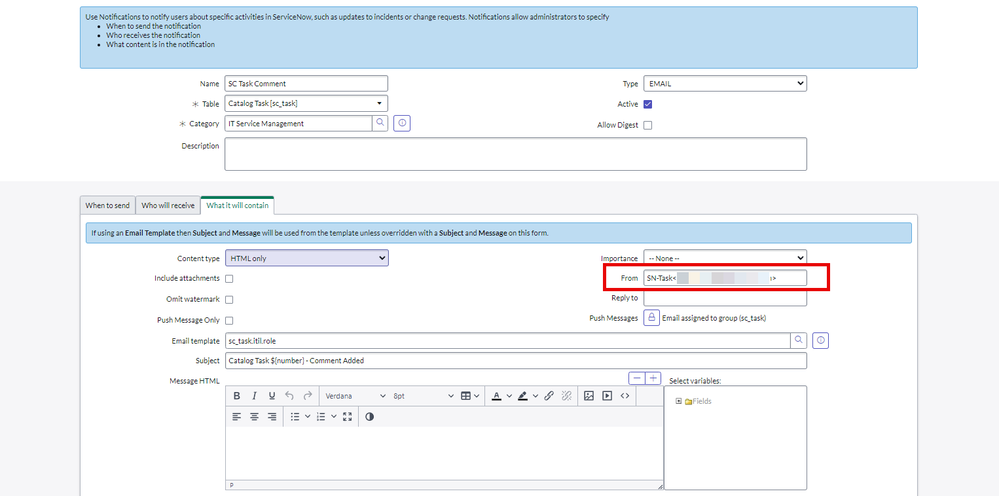
Open any Notifications >Open in advanced view> go to What it will contain section and Add "From" and "Reply To" email address as below
Format: DisplayName , ex: SN-Testhemanth@gmail.com
Make sure you set valid email address where domain is whitelisted in your org.
1)From: This show as a From email address in your inbox (Refer below screenshots)

2)Reply To: This woul be your reply to email when you would like to reply (when you click Reply or Replay All)
If you keep it empty , system email address apprears a reply to email

Results  :
:
From:

Reply To:
Click on Reply or Reply All

Email will be sent to below email address instead of system email address

email.setReplyTo("valid email address");
email.setFrom("valid email address");
2)Flow Designer Emails/Notifications:
1)Write BR (before insert) as below
a)Idenfity emails triggered through flow designer
i)look for the header source info X-ServiceNOw Source:FlowDesigner
ii)if you would like to set only to specific emails, Glide sys_flow_context table with the flow context sys_id above, check the flow name and drill down with subject line as well
b)Set user and reply field to set "From" and "Reply To" respectively
You can also dynamically pass the email address here or you can manage it with system property.


Flow: Which has sample Send email action with sample text

Result : This shows what you set in the Business Rule as From and Reply to address

When you click reply all

Reply email:

Thank you,
Hemanth
ServiceNow MVP 2024 and ServiceNow Community Rising Star 2022 & 2023
My other articles :
Read .CSV formatted files in ServiceNow
Automate Assessment/Survey Testing with ATF(Including Multiple Option,Attachments &Reference fields)
Set up interactive filter on UI builder (for data visualization reports and List records)
Set Up "Step Based Request Fulfillment" for Catalog Items
Need to know about Schedules and Define them in SLAs
My ServiceNow Share Projects:
Add signature and update fields to a fillable PDF document
Get Record URL action in the flow designer (Use it in the Send Email action)
https://www.servicenow.com/community/developer-articles/set-different-from-and-reply-to-emails-for-the-native-and-flow/ta-p/2936596