
How do I request a ServiceNow Impact Accelerator?
Are you ready to supercharge your ServiceNow experience with Impact Accelerators? These targeted offerings are designed to address your unique needs, whether it's upgrading quicker, implementing a new product, or optimizing your existing workflows. But how do you get started? Let's walk through the process step by step.
Accessing the Accelerator Catalog
Before you request an Accelerator, it's essential to familiarize yourself with the available options. Depending on the Impact package you are subscribed to, you can request and consume a designated number of concurrent Impact Accelerators.
Here's how you can access the Accelerator catalog:
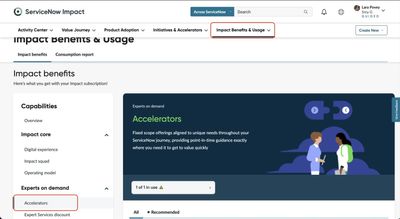
- Navigate to Impact Benefits & Usage: Head to Impact > Impact Benefits & Usage > Impact benefits > Capabilities > Experts on demand > Accelerators
- Select Accelerators: From the left-hand Capabilities menu, choose "Accelerators." Here, you'll find a selection of Accelerator tiles, each with a brief description and availability status.
- Drill In for Details: Click on an Accelerator tile to view additional details, such as availability and consumption bars. This information will help you make an informed decision about which Accelerator aligns best with your needs.


Requesting an Accelerator
Now that you've explored the catalog and identified the Accelerator that suits your requirements, it's time to request it. Here's how you can initiate the process:
1. Initiate an Accelerator: Navigate to Initiatives & Accelerators and click on "Accelerator catalog."

2. You can scroll down and look at the accelerators available to you based on the package you have. Drill In for Details: Click on an Accelerator tile to view additional details, such as availability and consumption bars. This information will help you make an informed decision about which Accelerator aligns best with your needs. You can then click Get Started.

3. Fill in the Details: Follow the simple, step-by-step guide to provide essential information about your initiative. Start by selecting a start and end date for the Accelerator, align it with a business objective, and add any necessary request notes.

4. Select Team Members: Choose the team members who will collaborate to achieve the initiative's objectives. This ensures that everyone is aligned and accountable throughout the process.

5. Start or Schedule: Once all the details are filled in, you can start the Accelerator immediately or schedule it for later. If available slots are filled, you can schedule it for a future date.
- Monitor Progress: Keep track of the Accelerator's progress by checking the status on the tile and monitoring its presence in the Initiatives & Accelerators list. This allows you to stay informed and ensure everything is on track.

Conclusion
With the Accelerator catalog at your fingertips and a streamlined process for requesting initiatives, accessing Impact Accelerators has never been easier. Whether you're looking to expedite an upgrade or optimize your workflows, these offerings are tailored to your organization's unique needs, helping you achieve your goals efficiently and effectively. So why wait? Dive in and unlock the full potential of your ServiceNow platform today!

Additional resources
https://www.servicenow.com/community/servicenow-impact-articles/how-do-i-request-a-servicenow-impact-accelerator/ta-p/2924211