
Welcome to Developer Support!
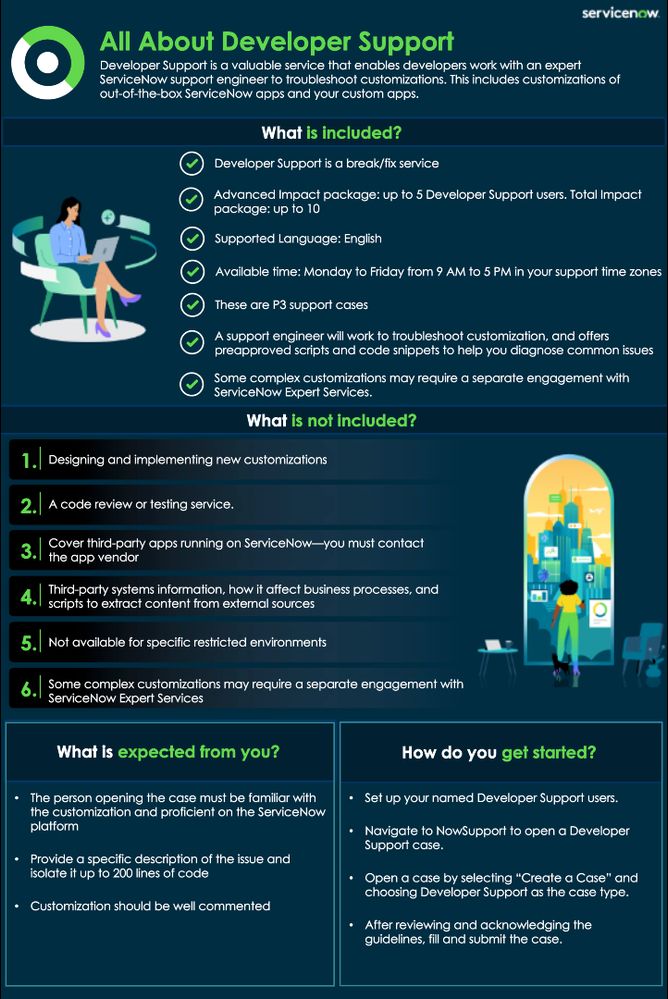
If you have purchased an Advanced or Total Impact package, did you know you’re entitled to Developer Support? This valuable and powerful service lets your developers work with an expert ServiceNow support engineer to troubleshoot customizations, including customizations of out-of-the-box ServiceNow apps and your own custom apps.
What’s covered by Developer Support?
Developer Support is a break/fix service, so you can use it if you have a customization that was working previously and has now stopped working. If you have an Advanced Impact package, you can have up to five named Developer Support users; if you have a Total Impact package, you can have up to 10. Support is in English and available Monday to Friday from 9 AM to 5 PM in your support time zone(s).
Developer Support requests are treated as P3 support cases. A support engineer will work with you to troubleshoot your customization. They can also answer questions on best practices for using ServiceNow APIs.
What isn’t included?
As we said, Developer Support is a break/fix service. It doesn’t include help with designing and implementing new customizations, code review, or testing. It also doesn’t cover third-party apps running on ServiceNow—you’ll need to contact the app vendor. There are also some limitations on troubleshooting integrations: ServiceNow doesn’t provide any information about third-party systems or how the data from these systems will affect your business processes, nor do we provide scripts to extract content from external sources.
Also note that while Developer Support covers both ServiceNow-hosted instances and customer-hosted instances, it isn’t available for certain restricted environments (for example, Australia IRAP-Protected data centers).
Finally, Developer Support will always make its best effort to resolve a customization issue, but some complex customizations may require a separate engagement with ServiceNow Expert Services.
What does Developer Support need from you?
The person opening the case must be familiar with the customization and proficient on the ServiceNow platform so we can work with them to resolve the issue. They’ll need to provide a specific description of the issue and isolate it to exactly 200 lines of code or less so we can help them address it quickly. The customization should be well commented so we can understand what it’s intended to do, and the issue must be reproducible on a sub-prod instance so we don’t impact your production environment when we investigate.
How do you get started with Developer Support?
First, set up your named Developer Support users. You can find instructions on how to do this here.
When a member of your team wants to open a Developer Support case, they just need to navigate to NowSupport. Provided they’re a named user, they can open a case by selecting “Create a Case” and choosing Developer Support as the case type. After reviewing and acknowledging the Developer Support guidelines, they’ll see a case form. They simply need to fill out the form and submit it. That’s it!

You can find detailed instructions on opening a Developer Support case here.

https://www.servicenow.com/community/servicenow-impact-articles/welcome-to-developer-support/ta-p/2921456