
All about Impact Technical Accelerators
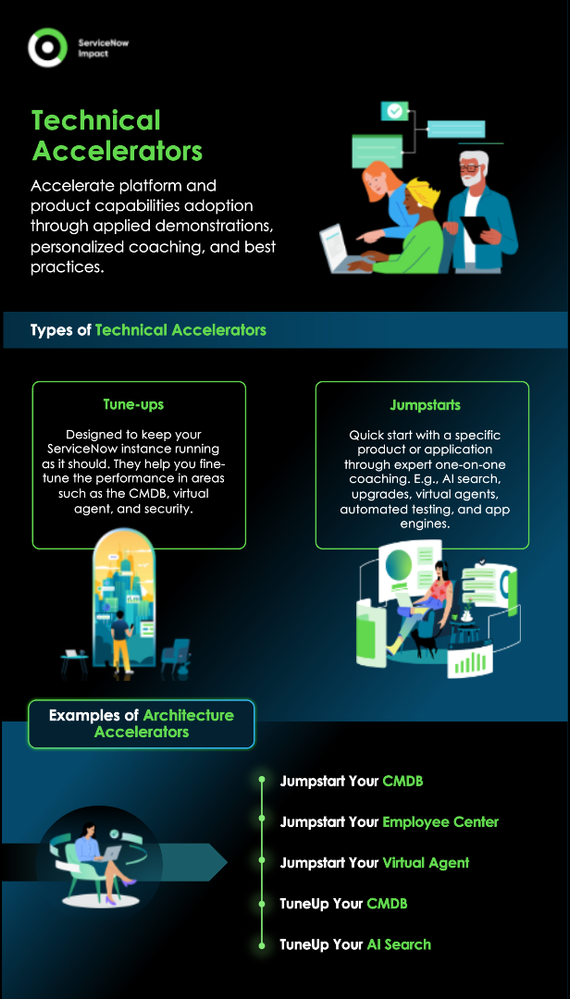
ServiceNow Impact lets you get more value out of your ServiceNow solution—and get it faster. One way it does this is with Impact Accelerators. These are fixed-scope service engagements that, as the name says, accelerate your ServiceNow journey in targeted areas. There are three types of Accelerators available: Strategy Accelerators, Architecture Accelerators, and Technical Accelerators.
In this blog, we’re going to take a deeper look at Technical Accelerators.
What are Technical Accelerators?
Technical Accelerators help you to adopt specific ServiceNow platform and product capabilities. For example, if you’re about to start implementing your CMDB — or want to get your existing CMDB running at peak performance — there’s a Technical Accelerator for that. In fact, there are more than 30 Technical Accelerators available, divided into two broad groups:
- Jumpstart Accelerators help you quickly learn a new capability so you can implement it quickly and successfully. Your technical consultant will typically provide personalized coaching and applied demonstrations to help you understand the capability, along with appropriate guidance and best practices.
- TuneUp Accelerators are designed to enhance the performance of capabilities you’ve already implemented. You’ll typically get an assessment of your existing implementation that identifies deficiencies and/or areas you need to improve. You’ll also get actionable recommendations on how to address these areas.
What are some examples of Technical Accelerators?
As we said, more than 30 Technical Accelerators are available, although the specific Accelerators you have access to depend on whether you have a Guided, Advanced, or Total Impact package. Here are some examples of typical Technical Accelerators:
- Jumpstart Your CMDB: This provides a comprehensive overview of CMDB capabilities and helps you build a strategy for CMDB success. You’ll get a 90-minute coaching session that includes a CMDB overview and applied demonstrations covering topics such as the CMDB workspace, Identification and Reconciliation Engine (IRE), the CMDB Data Manager, and CMDB health dashboards. Prior to the session, ServiceNow will set up a temporary instance for the demo that you can then access for 30 days. You can also request a second optional 60-minute coaching session for a CMDB Q&A.
- Jumpstart Your Employee Center: This shows you how to use the Employee Center portal to enhance the employee experience. In a 90-minute coaching session, you’ll get an overview of the portal and Employee engagement strategy, an applied demonstrations of Employee Center, a discussion of implementation and migration approaches, guidance on governance and reporting, and directions to key resources and guides. Once again, ServiceNow will set up a temporary instance that you can access for 30 days, and you can also request a follow-up Q&A session.
- Jumpstart Your Virtual Agent: This is designed to help you get going quickly with Virtual Agent for ITSM. ServiceNow will set up a temporary instance that is a copy of one of your production environments, activate Virtual Agent, and set up core topics. Then, you’ll get a 120-minute coaching session using this temporary instance, including an overview of Virtual Agent, a demo and process overview, guidance on successfully setting up Virtual Agent, and a personalized list of Virtual Agent topic recommendations. You’ll also get directions to key implementation resources and required plug-ins. Once again, you can request an optional follow-on session for Q&A and additional implementation guidance.
- TuneUp Your CMDB: This provides insights and guidance on how to improve the health of your existing CMDB. ServiceNow will set up a temporary instance that’s a copy of one of your selected production instances and run a Health Scan to identify common CMDB problems. Then, we’ll review the findings in a 90-minute coaching session, giving you an overall CMDB scorecard, highlighting problems and deficiencies, and providing recommended actions to remediate these. You can also request a follow-up coaching session for further Q&A on the findings and additional guidance.
- TuneUp Your AI Search: This provides guidance on how to fine-tune your AI Search implementation to increase its performance and value for your end users. We’ll set up a temporary instance that’s a copy of one of your production instances and assess the current state of your AI Search settings and performance. Then, you’ll get a 90-minute coaching session that reviews AI Search architecture and configuration best practices, provides an overview of AI Search analytics, shows you how to tune AI Search, and provides prescriptive guidance on how to optimize performance. Again, you can also request an optional follow-up Q&A session.
Again, these are only examples. You can find a full list of technical Accelerators here.


https://www.servicenow.com/community/servicenow-impact-articles/all-about-impact-technical-accelerators-nbsp/ta-p/2896350