
Mapping Configuration Manager
Overview
This simple application lets you automatically generate mapping entries for data quality issues from your integrations which you can then fix at your convenience without re-importing the data. It currently supports reference fields and choice lists.
Disclaimer
Mapping Configuration Manager is NOT an officially supported ServiceNow products. Mapping Configuration Manager does NOT come with any kind of warranty. If you use it, you own it!
System Requirements
- Vancouver or later
- Access to https://github.com/haurit/now-mappingcm
License
Copyright 2024 by Tom Hauri
Licensed under the Apache License, Version 2.0 (the "License")
You may not use Mapping Configuration Manager except in compliance with the License.
You may obtain a copy of the License at: https://www.apache.org/licenses/LICENSE-2.0
Unless required by applicable law or agreed to in writing, software distributed under the License is distributed on an "AS IS" BASIS, WITHOUT WARRANTIES OR CONDITIONS OF ANY KIND, either express or implied. See the License for the specific language governing permissions and limitations under the License.
Release Notes
1.0.0 - 04.2024
1.0.1 - 08.2024
- Corrected documentation link
- Allow scope access on tables
- Added Name column on list
- Added Read-Only field for automated mappings
- Fixed Parent Tables from Name to SysId to reflect correct reference type --> existing mapping configurations need to be adapted via background script (please contact me if you need this)
Problem Statement
Integrations often don't deliver the data in the right quality and you need to map between the values. While you can do that inside of your integrations, it has some distinct disadvantages:
- Errors are usually hidden in the logs
- The mapping must be maintained in different places
- Multiple integrations cannot easily share the same mappings
- After correcting the mapping, it is required to reload of the data from the integration again
Overview
Mapping Configuration Manager allows you to have one central place to handle your integration data mappings for reference fields and choice lists. It provides both the task list (e.g. a list of unmapped values) and the possibility to easily choose the correct data from the actual list to remedy the data quality issue.
The table is audited so you can track who modified it and allows you validate the data before applying it to all the data in the target tables so you don't have to re-import your data again.
Prerequisites
The Mapping Configuration Manager makes usage of the Global Tools - YAGUSIS application. Ensure that you have successfully installed the application before running the mapping apply function.
Installation
Usage
- Add the lookup to your integrations (call the doMappingValue function)
var _mappingCfgMgr = new x_snc_mapping_cm.MappingConfigManager(); _mappingCfgMgr.doMappingValue('parent_table', 'source_value', 'source_display_value', 'reference_or_choice_table', 'choice_field');
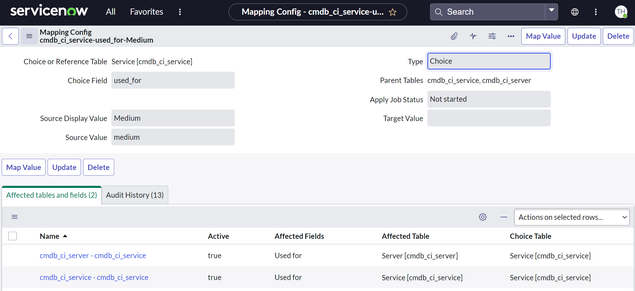
See Script Include section below for details and more functions.This will create this entries in the mapping configuration table that you can access in the menu "Mapping Config Manager" --> "Mapping Configs":
- Map the data to the correct value
- Apply the data to replace the source value with the target value on all records where the source value is used.You can create the system property "x_snc_mapping_cm_autoapproval" and set it to "false" if you want to have a custom approval before applying the value. Without that property the values are applied without approval.
Once the status changes to "approved" a business rule will schedule a job in the background that will go through the active affected tables and update the respective choice or reference fields and replace the source value with the target value on all of them. By default the system is setup to not trigger business rules and but to change the updated and updated by fields. If you want to overwrite this behavior, you can create a system property "x_snc_mapping_cm_enableworkflow" and set it to "true" to enable it globally or update the affected tables "Run Business Rules", "Update User and Timestamp" or "Apply Data Dictionary" settings.


Script Include: x_snc_mapping_cm.MappingConfigManager
doMappingValue
Purpose: This function allows you to either retrieve the mapped value or if that does not exist create the mapping configuration record so that it can be treated later.
Parameters:
sParentTable: The table where the value will be stored.sSourceValue: The source value provided by the integration.sSourceDisplayValue: The source display value provided by the integration.sRefOrChoiceTable: The table where the value should be found (either the referenced table or the choice list table).sChoiceField: (only for Choice Fields) The field in thesRefOrChoiceTablewhere the target value can be found.
Returns: The sTargetValue if not null or the sSourceValue if value has not yet been mapped.
getMappedValue
Purpose: This function retrieve the mapped value
Parameters:
sParentTable: The table where the value will be stored.sSourceValue: The source value provided by the integration.sRefOrChoiceTable: The table where the value should be found (either the referenced table or the choice list table).sChoiceField: (only for Choice Fields) The field in thesRefOrChoiceTablewhere the target value can be found.
Returns: The sTargetValue if not null or the sSourceValue if value has not yet been mapped.
Future ideas
- Provide custom action for Flow Designer
- Provide an example how to add an approval flow before applying the corrected value
- Provide the possibility to create a link (URL) to lookup the source value in the source system
https://www.servicenow.com/community/in-other-news/mapping-configuration-manager/ba-p/2890091