
Automate Assessment/Survey Testing with ATF(Including Multiple Option,Attachments &Reference fields)
Hi Everyone,
Are you currently performing manual testing of Assessments/Surveys after upgrades or enhancements? If so, and you'd like to explore automating these tests using ServiceNow's ATF (Automated Test Framework)
Here is step by step instructions to configure and execute them.
(Do this setup only in Sub production instances)
1)Check if ATF Plugin is installed ( Enabled by Default), if not install
System Defintion> Plugins
Serach for "Automated Test Framework" and install (Install if additional ATF plug in required ex: Automated Test Framework - Custom UI,Automated Test Framework - Application Navigator etc...)
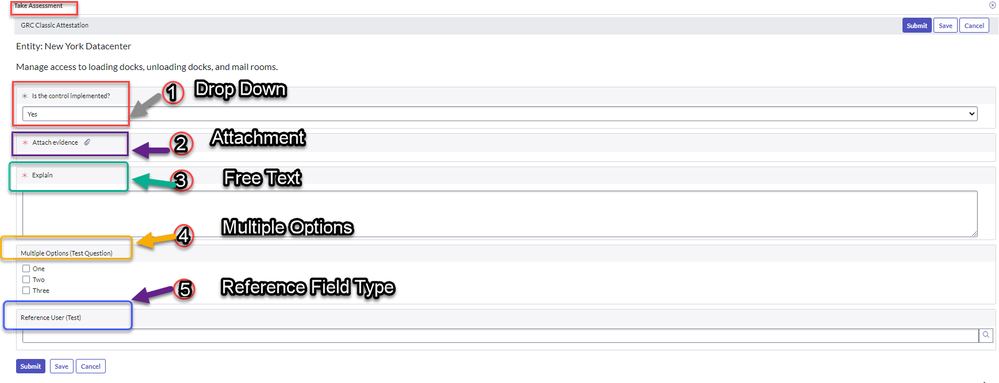
2)Lets say we would like to test below Assessment: which has
A)Drop Down
B)Free Text
C)Attachment
D)Multiple Options
E)Reference Field

3)Create a ATF test
Go to Automated Test Framework> Test>click new

4)Name the Test , Save. Click "Add Test Step"

5)Query assessment record by using "Record Query" step as below using dynamic conditions.

Conditions:

5)Add "Open an Existing Record" step to open assessment record found in the above step


3)Add "Click on UI Action" step to click on "Take Assessmemt" button

Select Tale Assessment UI action here to open the take assessment UI page

4) Select "Set Component Balues (Custom UI)" to retrive all the assessment questions.

Click Retrive Components :

This would open a new window to retrive all the questions. Once its done, go back to the above page and click "Next" to set assessment answers (Drop down value, Free text value, Multiple Selections and Reference field value)
You don't see Attachment Question on here (will get to that in next steps)

Attachment question will not appear as we don't have any client side step to upload, this should be done using "Add Attachment to existing record"
5)Add Record Query step and add dynamic conditions to get Attachment Question referencing this assessment

Cinditions to get A*ttachment* question dynamically

Select Assessment_instance_question table and pick previous record. Upload the Attachment to be tested


6)Add Step to submit the assessment using "Click Component (Custom UI)" and Click on Retrive components to retrive options available on the Assessment UI page

Select submt button and click Submit

7)Navigate to main test page and click "Run Test"

Watch the result now in a new window 


Navigate >Test Results related list under main Test record, this would give results for each step with screenshots

Open the record

Thank you,
Hemanth
ServiceNow MVP 2024 and ServiceNow Community Rising Star 2022 & 2023
My other articles :
Set up interactive filter on UI builder (for data visualization reports and List records)
Set Up "Step Based Request Fulfillment" for Catalog Items
Need to know about Schedules and Define them in SLAs
My ServiceNow Share Projects:
Add signature and update fields to a fillable PDF document
Get Record URL action in the flow designer (Use it in the Send Email action)
https://www.servicenow.com/community/developer-articles/automate-assessment-survey-testing-with-atf-including-multiple/ta-p/2890070