
Problem Management – What’s new in Xanadu
 New article articles in ServiceNow Community
·
Sep 10, 2024
·
article
New article articles in ServiceNow Community
·
Sep 10, 2024
·
article
Introducing problem management models in Xanadu, and the dynamic overview tab for problem records in Service Operations Workspace (SOW) 6.0.
Last time we looked at what was new in Washington.
What’s new at a glance in Xanadu:
- With Xanadu:
- Small life cycle improvements to the UI16 classic experience
- Introducing Problem Management Models
- Small life cycle improvements to the UI16 classic experience
- With Problem Management for SOW 6.0:
- Small life cycle improvements to the SOW experience
- Dynamic overview tab shows only the relevant data for each problem state
- Non-ITIL problem roles can access SOW
- Configure the Overview tab and Details tab via SOW Admin Center
- Small life cycle improvements to the SOW experience
With Xanadu
Small life cycle improvements to the UI16 classic experience
- Re-assess a Problem Task from Work in Progress
- Prompt for confirmation when you use Add All action in the Multi-Record Associator, for example, when you are relating additional incidents to this problem
- Relabelled First reported by to Origin task for new customers
- Known error articles problem knowledge integration is activated by default for new customers
Note: The problem knowledge integration is also known as the Problem Management Best Practice - Madrid - Knowledge Integration plugin (com.snc.best_practice.problem.madrid.knowledge)
Introducing Problem Management Models
Problem Management Models (also known as Problem Models) are preparing for future scenarios, for example: IT vs non-IT problems.
- Similar approach to change models
- A model allows you to tailor the problem or problem task experience per scenario:
- Include only states that are required
- Allow automatic transitions between states
- Define flows to use in your model life cycle
- Include only states that are required
- Initial problem models in Xanadu based on the Xanadu life cycle:
- Problem:
- Problem task:
- General problem task model
- Root cause analysis problem task model
- General problem task model
- The problem models are automatically activated by default for new customers
- Upgrade customers can decide to opt-in to using problem models, or wait for additional future scenarios to be added
- Optionally, if using problem models, you can create your own models:
- Create problem task models to match your problem task types
- If you create your own problem model, set it as the default and it will be used for every new problem you create. There is currently no way to switch between problem models
- Create problem task models to match your problem task types
| Problem management models are off by default in Xanadu because: Xanadu installs SOW 5.0 by default SOW 5.0 was released before Xanadu so does not support models You need to update to SOW 6.0 if you want to enable models |
|---|
With Problem Management for SOW 6.0
Small life cycle improvements to the SOW experience
- Support for Xanadu problem models for the problem and problem task life cycle
- New customers can manually search for AI-powered recommendations to quickly find solutions in the side panel
- Configure email notifications to direct SOW users to the SOW experience instead of the classic experience
- Support for additional types of fix task in the Create dropdown menu:
- Create defect or create enhancement if you have the Strategic Portfolio Management Agile Development 2.0 product
- Create improvement initiative if you have the Continual Improvement Management product
- Create defect or create enhancement if you have the Strategic Portfolio Management Agile Development 2.0 product
Requirements to manage in SOW 6.0
- ServiceNow with Xanadu (or later)
- Service Operations Workspace 6.0 (or later)
- Using the Xanadu base problem life cycle:
- Base problem life cycle means the Problem Management Best Practice – Madrid – State Model plugin
(com.snc.best_practice.problem.madrid.state_model) is activated - If the plugin is not activated, you can adopt the base problem life cycle with the Problem Management Migration Utility store application
- Base problem life cycle means the Problem Management Best Practice – Madrid – State Model plugin
If you do not meet the above requirements, you will be directed to the UI16 classic experience to manage problems and problem tasks
Dynamic overview tab shows only the relevant data for each problem state
Similar approach to the change dynamic overview tab.
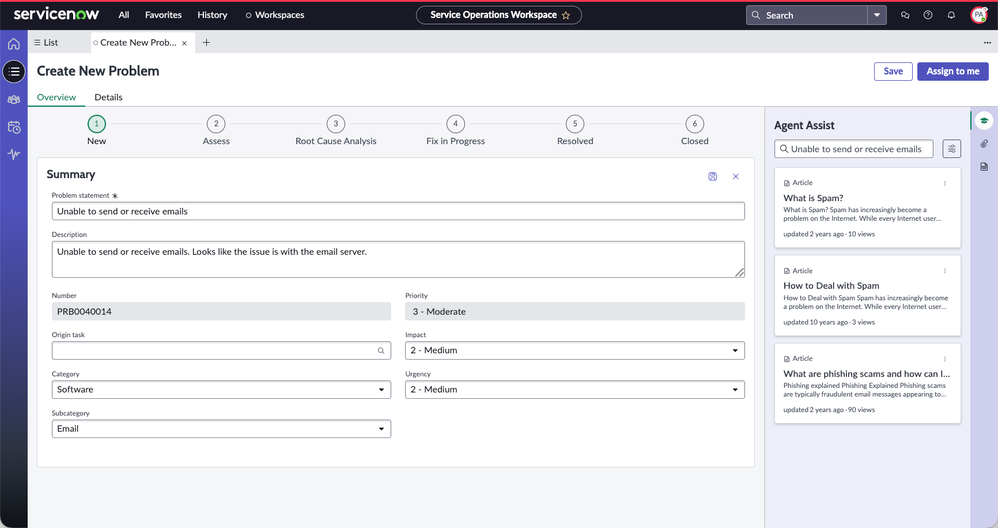
The dynamic overview in the problem record shows only the relevant data for each problem state, making it easier to see what information needs to be provided. Users more familiar with the UI16 classic experience can continue to use the Details tab.
Problem Overview tab – New state

Problem Overview tab – Root Cause Analysis state

Non-ITIL problem roles can also access SOW
Problem coordinators could already manage problems and problem tasks from SOW 5.0.
From SOW 6.0, the non-ITIL problem roles can access SOW:
- Problem task analysts can manage problem tasks in SOW
- Problem read or write roles (known as granular roles) can view or edit problems and problem tasks
Configure Overview tab and Details tab via SOW Admin Center
SOW Admin Center provides an easier way configure SOW Problem:
- Problem record:
- Overview tab – hide/show the overview tab and configure the sections and fields per state
- Details tab – configure the form layout
- Overview tab – hide/show the overview tab and configure the sections and fields per state
- Problem task record:
- Details tab – configure the form layout
SOW Admin Center – Problem record configuration

SOW Admin Center – Problem task record configuration

Next steps
You can read more about:
To share your ServiceNow product ideas, please visit the idea portal.
https://www.servicenow.com/community/itsm-blog/problem-management-what-s-new-in-xanadu/ba-p/3039910