
A little bit more about Time-Limited User Roles in ServiceNow!
Hello everyone,
As you’re probably aware, the latest release of ServiceNow (Washington D.C.) introduced several exciting features aimed at enhancing our day to day works in ServiceNow. Among these, the time-limited user roles feature caught my attention. While there are existing articles and videos on this topic, I believe there are some valuable insights and nuances that might have been overlooked. In this article, I’ll delve into the specifics of time-limited user roles, their limitations, and practical use cases.
What are Time-Limited User Roles?
As the name suggests, time-limited user roles allow us to assign specific role to users for a predefined duration. This feature is particularly useful when we want users to perform specific tasks within a limited
timeframe. Whether it’s granting temporary elevated privileges or ensuring compliance with security policies, time-limited user roles offer flexibility and control.
Key Points to Consider
While the official documentation provides essential information, there are a few aspects that you won’t find explicitly documented as mentioned below:
Individual User Assignment: Unlike traditional roles that can be assigned to groups/users, time-limited user role must be granted to each user individually. Unfortunately, there isn’t an option to apply these roles to an entire group. It would be convenient if ServiceNow allowed group-based assignments, but for now, we’ll need to manage this at the user level.
Granting Access to Multiple Users: Suppose you need to provide time-limited access to specific roles for multiple users. In such cases, manual assignment becomes cumbersome. However, scripting might come to the rescue. By automating the assignment process, you can efficiently grant roles as needed. This will be a custom solution.
Duration Limitations: ServiceNow enforces a maximum duration for time-limited user roles. Currently, you cannot set a role to last longer than two weeks. This limitation is governed by a business rule associated with the sys_user_has_role_time_limited table. While it’s technically possible to modify this rule, but it is not advisable.

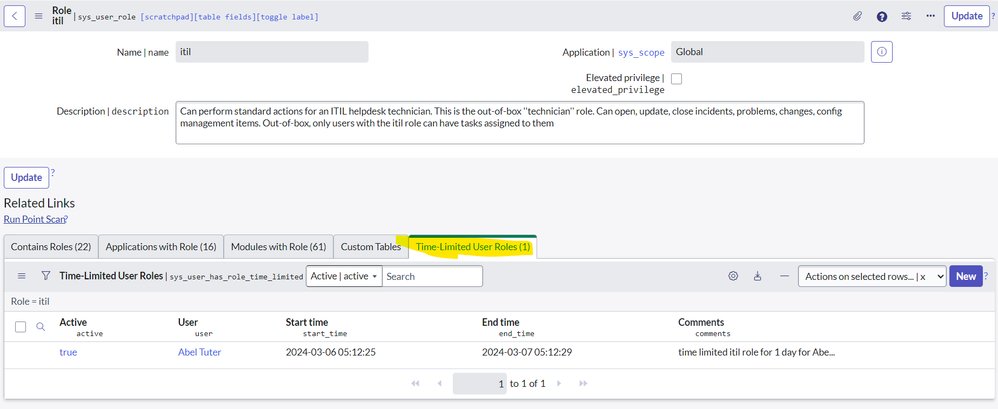
Visibility via Related Lists: To monitor time-limited roles, navigate to the “Time-Limited User Roles” module. Here, you’ll find a list of all time-limited roles assigned to users. But what if you’re viewing a user record or a role record directly? Fear not! You can easily add the related list named “Time-Limited User Roles” to both user and role records. This provides a quick overview of any time-limited roles associated with the user or role.


Conclusion
In summary, time-limited user roles offer a powerful mechanism for managing access rights within specific timeframes. While they have their limitations, understanding these things allows us to make informed decisions. So, the next time you encounter a scenario where temporary access is crucial, consider leveraging this feature.
If you found this article helpful or learned something new, please mark it as such. Feel free to bookmark it for future reference and stay tuned for more updates!
Thanks,
Mohit Kaushik
ServiceNow MVP (2023-2024)
https://www.servicenow.com/community/developer-articles/a-little-bit-more-about-time-limited-user-roles-in-servicenow/ta-p/2864594