
Financial planning on Agile Epics - How to set it up?
ServiceNow SPM now supports managing financials on agile entities like Epics in the Strategic Planning application. It enables the agile product or program managers to forecast the labor and non-labor costs of epics, re-forecast any changes in costs and track actuals from time sheets and invoices. The portfolio managers of Agile and hybrid portfolios can now efficiently plan and track the costs of their agile work using the new financials for agile capabilities.
Here is a step-by-step guide on how to enable financials on Agile Epics in ServiceNow SPM.
Step-by-Step Guide
- Install the latest plugins: Make sure to have the latest plugins for 'Scaled Agile Framework (SAFe) or 'Agile Development 2.0' and Strategic Planning are installed in the instance.
- Update the integration to map the planning item epic table with tables from Agile plugins
- Once the 'Strategic Planning' application is installed, navigate to the 'Integration' section.
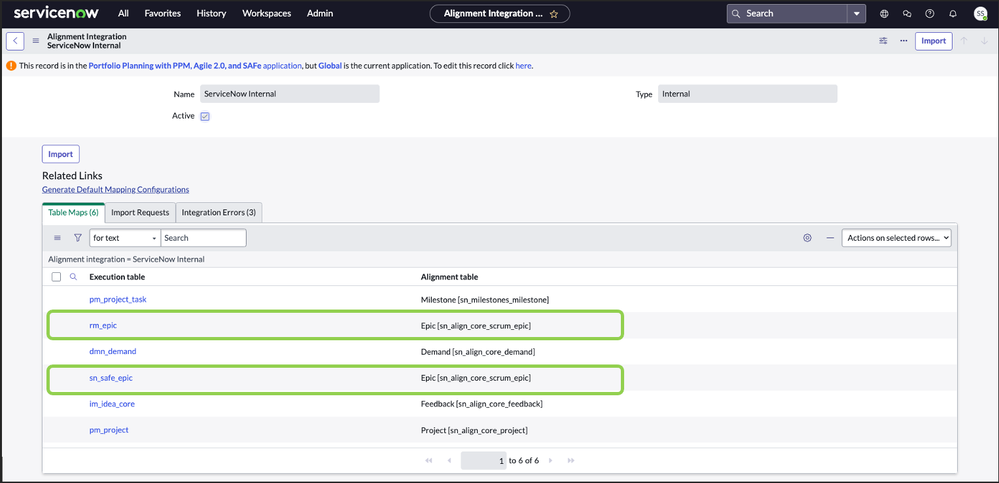
- Open the 'ServiceNow Internal' record.
- Ensure that its status is set to Active.
- Click on the 'Generate Default Mapping Configurations' link on the page.
- If you are using the Agile Developer 2.0 plugin: - Under 'Table Maps' related list, verify that a record for 'rm_epic' as the Execution table and 'sn_align_core_scrum_epic' as the Alignment table is present.
- If you are using the 'Scaled Agile Framework' plugins: - Under 'Table Maps' related list, verify that a record for 'sn_safe_epic' as the Execution table and 'sn_align_core_scrum_epic' as the Alignment table is present.
- Once the 'Strategic Planning' application is installed, navigate to the 'Integration' section.
- Update Investment Entities for Epic: Under 'Investment Funding -> Investment Entities', locate the record for Epic [sn_align_core_scrum_epic] and update it to Active. This step is crucial for enabling financial tracking on Epics within the Strategic Planning application.


Navigate to Strategic Planning Home page and open a portfolio plan with an Epic record in the prioritization list and open the Epic record page. You should now be able to see the ‘Financials’ tab as follows.

By setting agile financials following the steps outlined in this guide, you can enhance your organization's strategic planning capabilities and achieve better financial control over your agile and hybrid portfolios. Stay ahead with accurate financial insights using ServiceNow Strategic Planning.
For additional information on how to use the financials on Epics, watch this video - Generate Labor costs for Epic - YouTube
https://www.servicenow.com/community/spm-articles/financial-planning-on-agile-epics-how-to-set-it-up/ta-p/2811534