
6. Transaction Logs
Explanation -
The transaction log, which is accessed by navigating to System Logs > Transactions, records all browser activity for an instance. When debugging system issues, you can limit the number of transactions by applying a filter. For example, by user, application scope, or URL which includes the application or module connected to the client application.
Each transaction log contains several pieces of vital information that can be used later when working with stats.do and the localhost log.
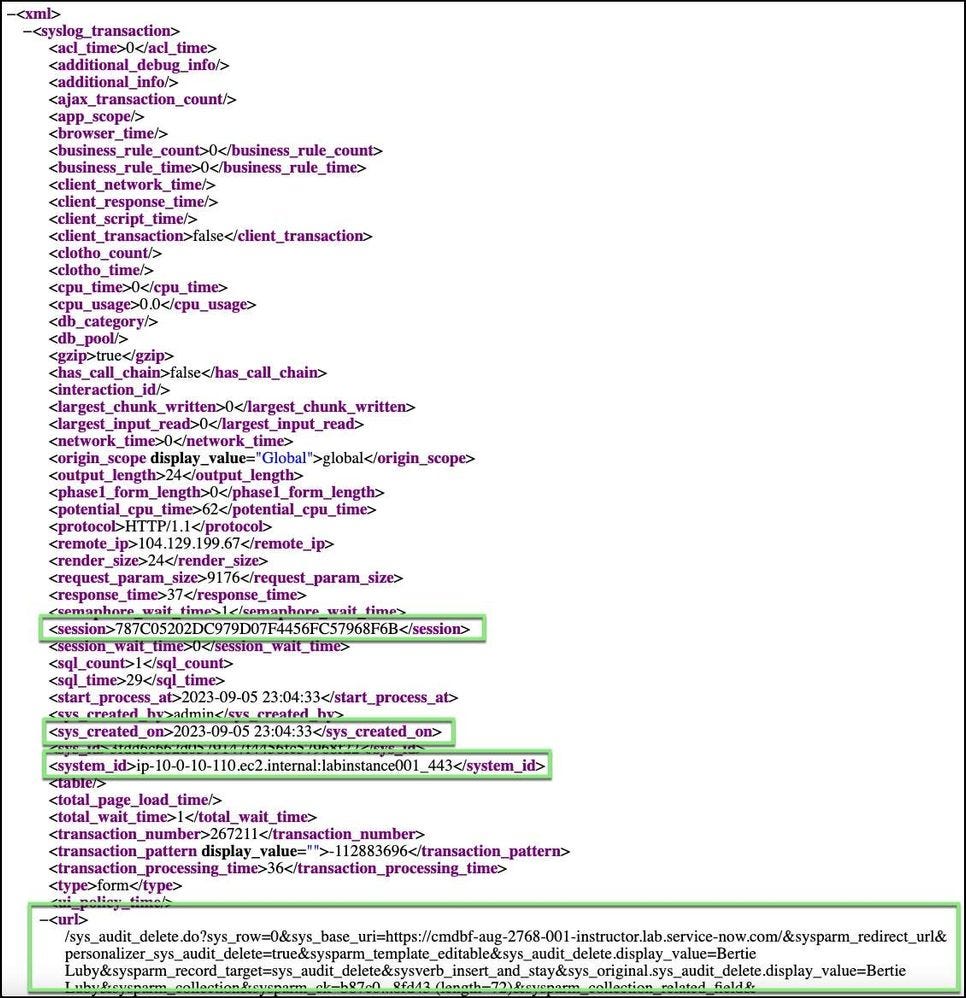
From the transaction log record, select the Additional Actions menu, and choose Show XML. Copy the following information for later reference.
- Session ID: provides the session ID for the user who performed the transaction. The session ID remains the same from login to log out.
- Created On: documents the actual time the transaction took place.
- System ID: tells you which node the transaction was handled on.
- URL: is actually searchable and allows you to search on what the user did and from which table. In the example below, the transaction log displays information about a deleted record that was performed by a user called Bertie Luby.
Example of XML code from a transaction log record
https://medium.com/@LearnITbyPrashant/transaction-logs-8f905157aa76?source=rss-d005fc598f0a------2