
Resource Assignment and Capacity Planning Guide
Are you ready to start your Strategic Portfolio Management (SPM) implementation journey for Resource Assignment and Capacity Planning?
This guide gives you valuable information you can share with your team, including proven guidance and links to key resources—all designed to set you on the path to success.
While this guide is primarily designed for ServiceNow platform owners and/or SPM Process Owners, and it also contains useful information if you have a different role in your organization. Let’s get started!
Guide overview
Here’s an overview of the topics we will cover in the guide:
- Concepts of Resource Assignment & Capacity Planning
- Resource Assignment Architecture
- Understand current use case & future state
- Charting your implementation path
- Additional Resources
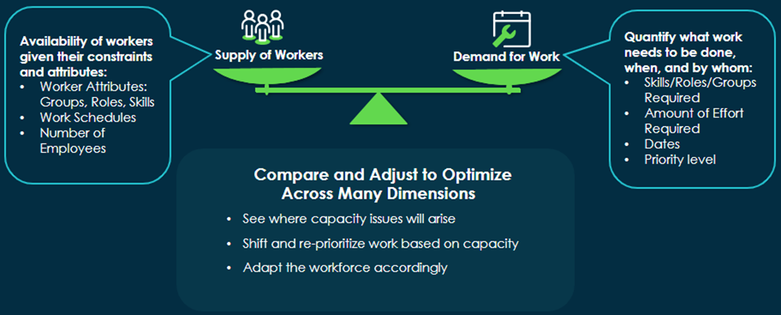
Capacity Planning is balancing the supply of resources and the demand for work in a portfolio.

Planning Attributes
Planning attributes are a common currency to bring together supply and demand of work.

The Path of Capacity Planning

Step 1: Estimate Effort (Demand of Work)
Make Resource Assignments to Demand, Projects, Project Tasks, Epics.
Step 2: Manage Capacity (Supply of Work)
Generate resource availability based on planning attributes in a time frame.
Step 3: Capacity Planning
Select the Workforce criteria for your Portfolio Plan
Analyze Capacity
Analyze capacity against the planned items (Demand, Project, Epic) based on the workforce criteria selected for your Portfolio Plan

2. Resource Assignment Architecture
Classic vs New

Data Model
Classic Resource Plan

Migrated Resource Plan

New Resource Assignment

3. Current Use Case

4. Future State

Resource Management Workspace
The Resource Management Workspace is a central tool for Resource Managers to manage the workload of their Resource Portfolio (all resources under their purview).
The First version released in November’23 provides:
- A complete view of all work, including both assigned and unassigned work as well as planned and operational work, to truly capture the accurate capacity and workload of an organization.
- Quickly and easily navigate between the Project Workspace and the Resource Management Workspace via hyperlinked work items and a consistent user experience.
More functionalities are planned to be included on next releases, as per the picture above.

5. Implementation Path

Recommendation for Planning Attributes: Plan and define Planning Attributes in the perspective of Capacity Planning before starting setup, even for cases on which Capacity Planning won't be used from beginning, as planning attributes are the common currency to aggregate and bring information together for Capacity Planning, but may also impact resource assignment process.
6. Additional Resources
Community Article: SPM Getting Started - Learning and Enablement
Workshop Recording: Discover and learn about “Capacity Planning” enhanced functionality on SPW
Meetup Recording: Discover Resource Assignment on Project Workspace
Community Article: Strategic Resource Capacity Planning - How to set it up and view capacity plans
ServiceNow Docs: Resource Management in Project Workspace
ServiceNow Docs: Capacity planning in Portfolio Planning
https://www.servicenow.com/community/spm-articles/resource-assignment-and-capacity-planning-guide/ta-p/2768752