
Registering and Onboarding a New Service Bridge Consumer Connection
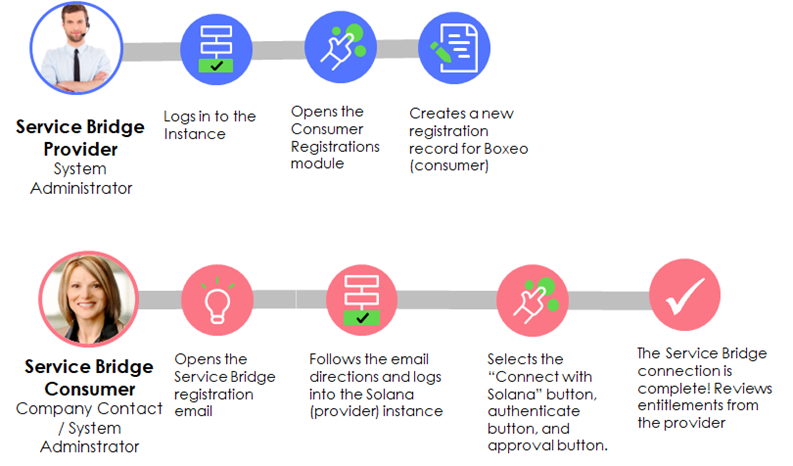
In the third installment in this series of Service Bridge articles, we will cover the registration and onboarding of a new Service Bridge consumer.
For an introduction to Service Bridge and instruction on installing and configuring Service Bridge on a provider instance, see Installing and Configuring Service Bridge for Providers.
Registration of a new consumer in Service Bridge establishes an instance-to-instance connection between the provider and consumer instances. The provider registers a new consumer by creating a registration task for that consumer’s company. The identified consumer company contact will receive an email when the registration task is created, providing them with instructions on how to complete the registration process. If email sending is not enabled on the provider instance the registration task work notes contain a link to the registration instructions that the provider administrator can copy and send to the consumer contact.

Provider Actions
Consumer registration prerequisites:
- Role required: admin
- A Service Bridge provider record must have been created (See the previous article on Installing and Configuring Service Bridge for Providers)
- The consumer company must exist in the provider instance, with a company contact identified who is a consumer instance administrator
- The consumer company contact must have active credentials and be assigned the Service Bridge Consumer role (sn_sb_pro.consumer) on the provider’s instance
- Service Bridge uses the Key Management Framework (KMF) Key Exchange request process flow to send encrypted data between the Provider and Consumer instances. Before registering a new consumer make sure that the KMF is running correctly by running a Key Management Framework Health Check.
- Grant the admin sn_kmf.admin, sn_kmf_cryptographic_auditor or sn_kmf_cryptographic_manager role then log out and back in.
- Navigate to Key Management > Health (Diagnostics) and ensure the health check passes (this may require refreshing the report multiple times)
- Grant the admin sn_kmf.admin, sn_kmf_cryptographic_auditor or sn_kmf_cryptographic_manager role then log out and back in.
The provider system administrator should complete the following steps to register a new Service Bridge consumer:
- Navigate to All > Service Bridge Provider > Consumer Registrations and click New.
- Enter the following details:
- Select the Company associated with the consumer instance being registered.
- Select the contact details associated with the Company you have selected


- Click the Lock icon on the URL field and enter the URL of the consumer ServiceNow instance.
- Enter the instance ID of the consumer ServiceNow instance in the Instance ID field
An email is generated and sent to the specified Consumer Contact. If email sending is not enabled, the admin must copy the link from the registration task work notes and manually send it to the consumer admin. The Consumer Contact must follow the steps listed in the Registering with a provider to complete the registration process on the consumer instance.
Consumer Actions
The designated consumer company contact will receive an email containing a registration link from the provider’s instance or directly from the provider administrator.
https://www.servicenow.com/community/technology-blog/registering-and-onboarding-a-new-service-bridge-consumer/ba-p/2769590