
Multi Branding Service Portal
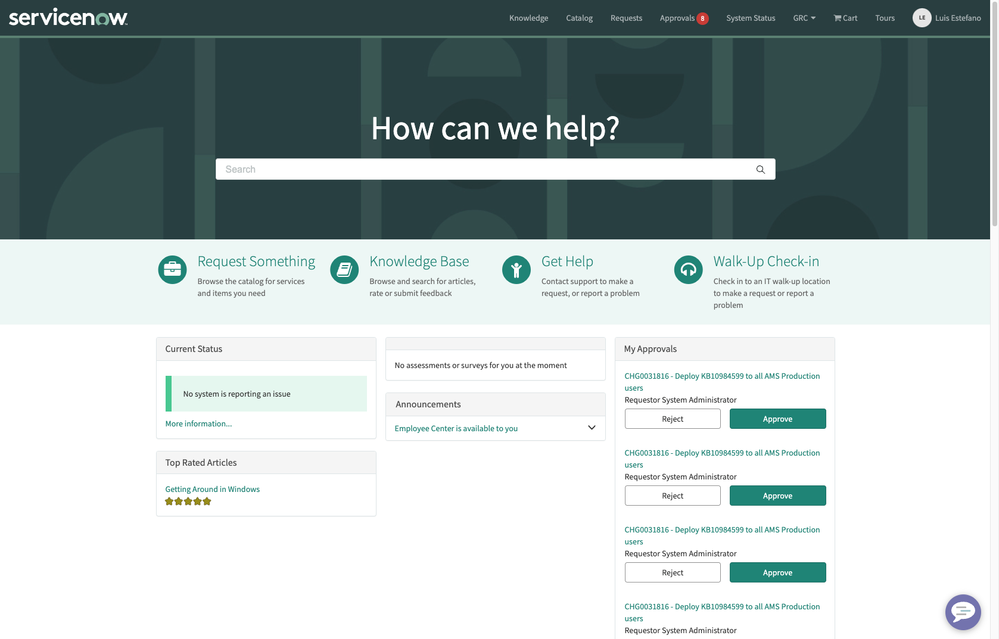
Service Portal is intended to give a great user experience to our employees or customers, allowing them to access their services on a quick and easy way.
But, what if we want to go one step forward and give them the best possible experience, we can align the portal with their corporative branding. In this way, the employees from different sub-companies, or the customers from different accounts could enjoy a better experience when accessing the Service Portal.
How we can accomplish MutiBranding Portal?
The idea is to create new StyleSheets per company/account we want to personalize the exprience for. Then, when accessing the Portal we check the logged in user company/account and load the StyleSheet if there is one for that particular company/account, and we keep the default styles if not.
SOLUTION
In the next example, we are personalising the experience for customers, so we are using the Account Number in order to distinguish the different StyleSheets, but it could be done also for employees/sub-companies.
- Create StyleSheet with the Account Number as Name and set the personalised styles there. Do not attach the StyleSheet to the Portal theme, as it will be done dynamically based on the Account the logged in user is member of.
New StyleSheet:
- Name: ACCT0000001 (Account Number)
CSS:
body {
/* Hack for prevent default styles to appear before the personalised ones */
display: block;
}
h2 a,
a {
color: #ffa31a !important;
}
.navbar {
background-color: #043559;
border-bottom: .4rem solid #ffa31a !important;
}
.navbar .navbar-brand-logo {
background-image: url('/Acme_logo_yellow.png');
background-position: 10px 10px;
background-repeat: no-repeat;
background-size: 195px 50px;
width:200px;
height: 50px;
margin: 0;
}
.navbar .navbar-brand-logo img {
display: none !important;
}
.navbar a {
color: #ffa31a !important;
text-transform: uppercase !important;
font-weight: bolder;
}
body main.body .cbe98a8d2cb20020000f8d856634c9c63 {
background: rgb(2,0,36) !important;
background: linear-gradient(180deg, rgba(2, 29, 49,1) 0%, rgba(4,53,89,1) 35%, rgba(0,212,255,1) 100%) !important;
}
main.body .homepage-quicklinks {
background-color: #eeeeee;
}
main.body .homepage-quicklinks a h2 {
color: #ffa31a;
}
.btn-primary {
color: #043559;
background-color: #00d4ff;
border-color: #04a3c3;
}
.v94c300c7e777320075c2a117c2f6a9e7 .spw-announcements-root .details div.title div, .v94c300c7e777320075c2a117c2f6a9e7 .spw-announcements-root .details div.title a {
color: #ffa31a;
}
.v1e699082d7001200a9addd173e24d4e3 .bs-callout-success {
background-color: #ffe0b3 !important;
border-color: #ffa31a !important;
}
Note: it is a quick example in which we configure some basic colours for links, sections' backgrounds, and we change the corporative logo selecting one we previously uploaded to System Images.- Create a client callable Script Include in which we define the function returning the Account number for the current user.
New Script Include:
- Create a client callable Script Include in which we define the function returning the Account number for the current user.
Name: multiBrandingSP
API Name: global.multiBrandingSP
Client Callable: true
Application: Global
Accessible from: All application scopes
Active: true
Script:
var multiBrandingSP = Class.create();

multiBrandingSP.prototype = Object.extendsObject(AbstractAjaxProcessor, {

   getStyleSheetFromAccount: function() {

       try {

           var css_id = '';

           var user_account_number = '';

           // Get user account number

           var userAccountGR = new GlideRecord('customer_account');

           if (userAccountGR.get(gs.getUser().getCompanyID()))

               user_account_number = userAccountGR.getValue('number');

           // Get StyleSheet by name using the account number

           var styleSheetGR = new GlideRecord('sp_css');

           if (styleSheetGR.get('name', user_account_number))

               css_id = styleSheetGR.getUniqueValue();

           // Return StyleSheet sys_id

           return css_id;

       } catch (e) {

           gs.error('Error - ScriptInclude (multiBrandingSP): ' + e);

       }

   },

   type: 'multiBrandingSP'

});
- Create a UI Script to load the StyleSheet if there is one for the user account.
New UI Script:
- Create a UI Script to load the StyleSheet if there is one for the user account.
API name: serviceportal_overlay
UI Type: All
Application: Global
Active: true
Script:
loadMultiBrandingStyles();

function loadMultiBrandingStyles() {

   // Call the Script Include in order to get the StyleSheet sys_id

   var ga = new GlideAjax('global.multiBrandingSP');

   ga.addParam('sysparm_name', 'getStyleSheetFromAccount');

   ga.getXML(uploadStyleSheet);

}

function uploadStyleSheet(response) {

   var answer = response.responseXML.documentElement.getAttribute("answer");

   // If any sys_id is returned, load the associated StyleSheet

   if (answer)

       jQuery('head').append('<link rel="stylesheet" type="text/css" href="/' + answer + '.spcssdbx?">');

   // Else allows the default styles to be displayed.

   else

       jQuery('body').attr('style', 'display:block');

}
- Attach the previous UI Script to the Service Portal theme
- Customise default StyleSheet for the theme in order to do not display content. It prevents the default styles to appear for an instant before we load the personalised styles. If this is not needed, you can avoid the "else" code on the previous UI Script and also this 5th step.
Customise default StyleSheet:
Name: sp-theme-la-jolla.css
CSS (add the following line):
body {display:none;}
RESULT
Default Service Portal style when there is no StyleSheet defined for the logged in user account:

Personalised Service Portal style when there is a StyleSheet defined for the logged in user account. In this example we changed the corporative logo, colours and backgrounds:

ALTERNATIVE SOLUTION
Same solution could be achieved by different ways. Another one is to create a custom widget and embed it on the Portal Header, loading the desired StyleSheet if there is one associated with the user company/account.
Widget Body HTML Template:
<link href="/{{::data.css_id}}.spcssdbx?" rel="stylesheet" type="text/css" ng-if="data.css_id!=''" />
Widget Server Script:
(function() {

    try {

        data.css_id = '';
        var user_account_number = '';

        var userAccountGR = new GlideRecord('customer_account');
        if (userAccountGR.get(gs.getUser().getCompanyID()))
            user_account_number = userAccountGR.getValue('number');

        var styleSheetGR = new GlideRecord('sp_css');
        if (styleSheetGR.get('name', user_account_number))
            data.css_id = styleSheetGR.getUniqueValue();


    } catch (e) {
        gs.error('Error - Widget (SN - Load Customer StyleSheet): ' + e);
    }

})();
Header Body HTML Template:
<sp-widget widget="data.loadCustomerStyle"></sp-widget>
SOLUTION CONSIDERATIONS
The proposed solution has no contras or secondary effects as it does not require any update on ootb records, so there will not be any conflict raised when upgrading the platform. On the other hand, the alternative solution is updating the Portal Header and could require some effort on maintenance/upgrade, that is why it is not the best option.
Hope it helps! 
Kind regards,
Luis Estéfano

https://www.servicenow.com/community/developer-articles/multi-branding-service-portal/ta-p/2765412