
Save as you go flows / Default read-only flows, why it is not enabled, or... how to disable it?!
 New article articles in ServiceNow Community
·
Sep 09, 2024
·
article
New article articles in ServiceNow Community
·
Sep 09, 2024
·
article
 Mark Roethof
Hi there,
Do you recall from the Washington DC release notes, "Save flows automatically as you work on them" and "You must request to edit an existing flow before you can change it"? You might have seen this in action, or not... On some instances "Save as you go flows" and "Default read-only flows" is active, while on other instances "Save as you go flows" and "Default read-only flows" is not active. What's the catch?!
Let's have a closer at Save as you go flows and Default read-only flows  .
.
Washington DC
According to the Washington DC release notes and the associated Docs pages, there should be a change in behavior when working with Flow Designer. A change in behavior more specifically regarding saving Flows and Flows being read-only by default.
Save as you go flows
"As of the Washington DC release, Workflow Studio no longer displays a Save button in the header of the editor canvas while you edit a flow. Rather than manually saving your flow, Workflow Studio saves your flow as you work on it."
- Source: Docs
Default read-only flows
"As of the Washington DC release, you must request to edit an existing flow before you can change it. If you don't have permission to edit a flow, the Edit flow button remains disabled."
- Source: Docs
Enable / disable Save as you go flows / Default read-only flows
For the why behind this change in behavior, do visit the Docs pages as that is clearly described. What is not described though, is why on some instances this is active and why it is not on other instances, how can we enable or disable this behavior ourselves?
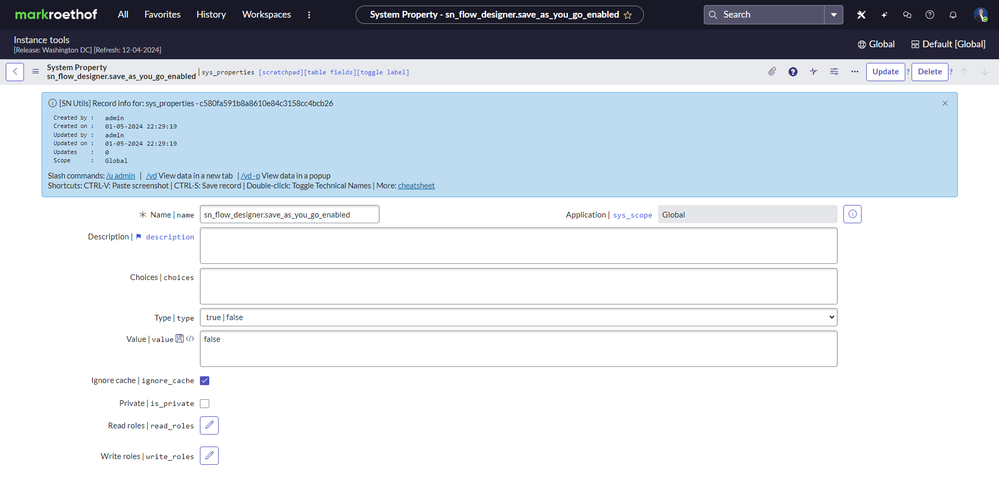
The ServiceNow Docs does not mention anything on how to enable or disable the behavior of Save as you go flows or Default read-only flows. We can control this ourselves though! Going through my routine of turning an instance upside down after upgrading it, I stumbled on System Property "sn_flow_designer.save_as_you_go_enabled".

While the name of the System Property hints at the Save as you go flows feature, it actually also controls the Default read-only flows feature! I noticed this while testing the behavior of this System Property, changing its value, performing a cache.do, and re-opening Flow Designer. Visually you could see:
Pre-Washington DC

Save as you go flows / Default read-only flows (Washington DC)

Result
Why this System Property is enabled for some instances and is not enabled for other instances, I have no clue, ask ServiceNow . I am just sharing a small piece of undocumented, and how you can control the behavior of Save as you go flows and Default read-only flows if you desire.
---
That's it. Hope you like it. If any questions or remarks, let me know!
Kind regards,
Mark Roethof
Independent ServiceNow Consultant
9x ServiceNow MVP
---

https://www.servicenow.com/community/developer-articles/save-as-you-go-flows-default-read-only-flows-why-it-is-not/ta-p/3032895