
ServiceNow Learning 101: Usage of input variables while configuring Script Steps in Flow Designers
Hi All,
Today I will talk about how to use the input variables in Script Step of your Flow Designer. Please have a look:
Use Script steps to run server-side JavaScript in an action. Script steps include separate input and output variables to map action data to JavaScript data.
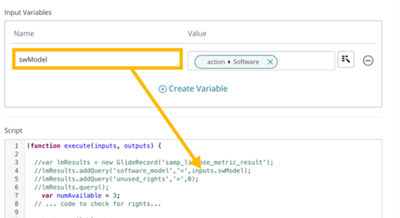
Input variables pass information to the script. Input variables can contain static information or dynamic information from the action. Use a data pill to dynamically set the input variable value. The inputs object is automatically instantiated and stores the input variables as object properties. Use the syntax inputs.variableName to use an input variable in the script.
Output variables create data pills to pass data from the script to other steps or action outputs. Output variables get their values from the script. The outputs object is automatically instantiated and stores the output variables as object properties. Use the syntax outputs.variableName = valueFromScript to set the value of an output variable.
Input Variables

Output variables:

Hope it helps you.
I hope this article helpful. Please mark it as helpful and bookmark if you like it.
Regards,
Shamma Negi
https://www.servicenow.com/community/developer-blog/servicenow-learning-101-usage-of-input-variables-while/ba-p/2760211