
Managing Outages within a Service Management Enviroment
An IT outage is when computer systems or networks stop working correctly, often due to hardware issues, software glitches, or other unforeseen events. This disruption can lead to downtime, impacting productivity and business operations. To minimize such issues having a well established process for managing outages is essential.
This article aims to take you through
- What is an outage?
- Common Use Cases
- Outages relationship to Services
- Creating Outage records
- Who should be involved
- Reporting Outages
Outage Overview
An Outage represents CI unavailability. The causes are :
- Outage
- Planned Outage
- usually the result of a routine maintenance schedule, upgrade action
- Degradation
- Partial, Slow, Intermittent
CI unavailability, or outage, is the actual downtime of a CI. [1]
ServiceNow provides the capability to
- Create a stand-alone outage record
- Associate an outage record to a task
- Create an outage record from a task
Outages have a key relationship to Incident Management and Major Incident Management.
[1] Whenever there is an outage for any of the CI items, the outage information is stored in the Outage [cmdb_ci_outage] table. The Task-Outage table [task_outage] maintains the mapping between the Task [task] table and the Outage [cmdb_ci_outage] table.
Outage Use Case
Outages on their own are data points rather than informational e.g., knowing database_server123@mycompany.com is offline helps the IT staff work the issue and knowing that Finance Services are unavailable. Its month-end is far more informative.
Look at a simple outage case and a single CI relating its outage impact to 4 Services.

Looking through those, how could the services each be affected differently by the outage
| Service 1 | Demands of the Service on the CI are still able to be met by the CI degradation |
|---|---|
| Service 2 | Demands of the Service on the CI are unable to be met by the CI degradation & outage |
| Service 3 | Demands of the Service on the CI cannot be met by the CI degradation and the outage is not impactful. One possible scenario is CI failover meant service availability was unaffected. |
| Service 4 | Demands of the Service on the CI are still able to be met by the CI degradation and outage was not impactful (similar to service 3). An alternative is that the service was not operational at the time; therefore no impact. |
The key here is if you want to consider outages, then this cannot be independent of services.
Service Relationship to Outages
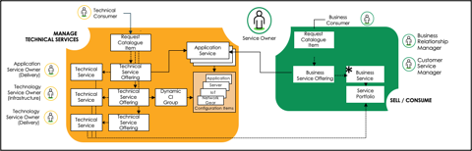
Examining the CSDM shows the relationships between CIs and services/service offerings.

Depending on the organization's needs, there will be technical services, business services, and offerings in the service portfolio. An example of a service is shown below.

Mapping services/service offerings to the CI’s will ensure that outage records, and associated task (predominately incident) records will provide the most value to the business.
When considering how to configure IT services within your portfolio, work on those that provide the most value to the organization. It is also possible to represent IT services within a request catalog.
Each service in the portfolio can have a criticality assigned, allowing :
- The impact of a CI outage is related to the affected services
- Proportionate response based on the criticality of those affected services
For example, the company retail website would require a higher criticality than office print services.
Outage relationship to Service Portfolio Management / Digital Portfolio Management
Outages affect Service availability. The roll-up of the outages through service availability is viewed in service offerings.

View availability results for commitments on service offerings and application services using Service Portfolio Management.
For more details on Service Portfolio Management, see Service Portfolio Management - Process Workshop, and Digital Portfolio Management, see Digital Portfolio Management - Process Workshop Presentation.
Outage Creation
Outages can be a stand-alone record or associated with one or more tasks. Outage records typically contain:
- Outage CI
- Outage Type
- Outage, Degradation, Planned Outage
- Beginning and End time
- Related Task
- Description text
Outages can be created manually by an agent/operator or automatically, e.g., every P1 incident has an outage automatically created, and P2 and below are manually created.
When considering if an outage should is to be created automatically, the population of the fields in the outage record needs consideration, especially those around timing. As an example, it would be possible to create the outage automatically with the start date/time of the incident and then the outage record updated on the close/resolution of the P1. Consider though the example uses cases previously given – would this accurately represent the outage period?
Where the Outage record is created manually, the timings may be set as part of the RCA (Root Cause Analysis). Typically, the RCA process is managed by the person who is fulfilling the role of Major Incident Management or Service Delivery Manager.
More details related to this topic is found in Task Outage and Log Outages
Minimizing Outages
As well the creation of outages, it is important to consider ways of minimizing them, providing a long-term sustainable approach in delivering service availability. Approaches to take are shown below :
Preventative Maintenance
Hardware and software should be regularly maintained to prevent failures and issues such as security vulnerabilities.
Redundancy
Have redundant and backup systems and solutions to provide continuity of service in the event of a failure.
Monitoring
Use monitoring tools to assist detection of potential issues before they can causes outages, taking proactive measures to address.
Incident Response
It is important that there is a well-defined incident response plan for handling outages to minimize the impact and resolve the issue as quickly as possible.
Roles and Responsibilities
| Role Name | Service Desk Agent (1st Line) |
|---|---|
| Description | The Service Desk Agent (SDA) is responsible for raising incidents and associating CI’s to them. If required, they will create outage records and associate that record with the incident. The Service Desk agent is responsible for assigning tasks to the IT Support Teams and assists in resolving the incident. |
| Role Name | Operator |
|---|---|
| Description | The operator, as part of the IT Operations Management team, is likely to be monitoring the IT systems and, therefore, create outage records based on CI status from their monitoring systems. |
| Role Name | IT Support Teams (2nd / 3rd Line) |
|---|---|
| Description | The IT Support Teams is responsible for providing specialist knowledge and skills in resolving the incident. |
| Role Name | Major Incident Manager |
|---|---|
| Description | The Major Incident Manager is concerned entirely with major incidents. They are the coordinator responsible for resolving a major incident as soon as possible and ensuring it does not reoccur. If the outage is severe enough, e.g., disrupting critical service availability, a major incident may be raised. |
| Role Name | Incident Management Process Owner |
|---|---|
| Description | The Incident Management Process Owner’s primary objective is to own and maintain the Incident Management process. The Process Owner is usually a senior manager with the ability and authority to ensure the process is rolled out and used by all stakeholders. Part of their responsibility is reporting on Outages. |
Reporting
Operational Reporting
From an operational perspective, Outages have a significant influence in cost and risk.
Reporting of incidents generally falls under the responsibility of the Incident Management Process owner and forms part of their KPIs.[1] Examples of these are:
[1] Task-Outage table [task_outage] maintains the mapping between the Task [task] table and the Outage [cmdb_ci_outage] table.
| Cost | Optimize Major Incident Response |
|---|---|
| Reduce Outage Volume Worked | # of Unplanned Outages |
| Reduce Outage Response Effort | Unplanned Outage MTTR |
| Risk | Ensure High Availability |
|---|---|
| Reduce Business Disruption from Outages (Volume) | # of Unplanned Outages |
| Reduce Business Disruption from Outages (Duration) | Unplanned Outage MTTR |
Service Status on Service portal
The Service Portal provides an essential method of communicating outages and service availability to users.
There are several widgets provided. Review them here: Service Portal service status widgets
These can provide status to both the service owners and service consumers.
Service Overall Status

Service Status over time


https://www.servicenow.com/community/itsm-articles/managing-outages-within-a-service-management-enviroment/ta-p/2751849