
Notify Provider Selector - Demystified
As a part of the Notify framework, one has the option to configure multiple conference providers. This can be challenging as there could be complex use cases which need to be considered for allowing a specific provider for a specific use case.
For example, one may want to show Microsoft Teams only on conferences initiated from Incident, whereas use Zoom for all Change related conferences.
Such use cases can be handled by Provider Selector.
A Provider Selector entry is like a Rule which specifies certain conditions which when met the entry is selected for a particular use case. If you have multiple Provider Selector entries, they are evaluated one by one based on the order field and in case of a match, the choices specified for a provider selector entry are shown. If there are no conditions that match, then the catch-all (erstwhile default) provider selector entry is chosen.
Lets understand this by an example.
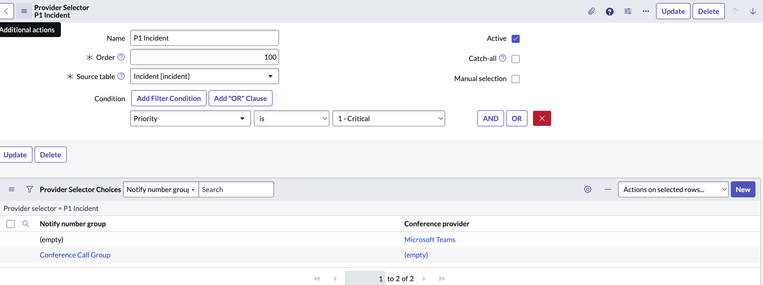
We have 3 providers selector records, P1 Incident, P2 Incident & All Incidents.
1. P1 Incident

2. P2 Incident

3. All Incidents

As one can see, "All Incidents" record is having the catch-all selected and there is no order.
Now when we launch the start conference dialog for a P1 Incident, the choices Microsoft Teams and Twilio phone number mapped to Notify Group Conference Call Group will show up. For P2 only Microsoft Teams will show and for all other incidents and other task tables only Zoom will show up.
Simple use case to have single configuration for all kinds of table records
If your use case is simple and only requires one configuration for all tables, then you may only add one Provider Selector entry with Catch-all selected and configure all the providers as Provider Selector Choices for the sole provider selector entry.
Below screenshots are for a default use case setup where all 4 conference providers are selected.


Note : When adding choices, you must choose one option between a Notify Number Group and a conference Providers.

For Telephony providers like Twilio, one needs to map the phone number to a group and then choose that group in the "Notify Number Group" selector above.


When using Provider Selector for setting up Telephony provider ( like Twilio ) you can safely empty out the properties glide.notify.task.phone_number & com.snc.iam.notify_number.


Note: If you have a use case to Default to a conference provider instead of a Telephony number we have a Workaround here KB1573152
https://www.servicenow.com/community/itsm-articles/notify-provider-selector-demystified/ta-p/2731323