
SN Utils Slashcommands
 TechSavvy
·
Jan 28, 2024
·
article
TechSavvy
·
Jan 28, 2024
·
article
 TechSavvy
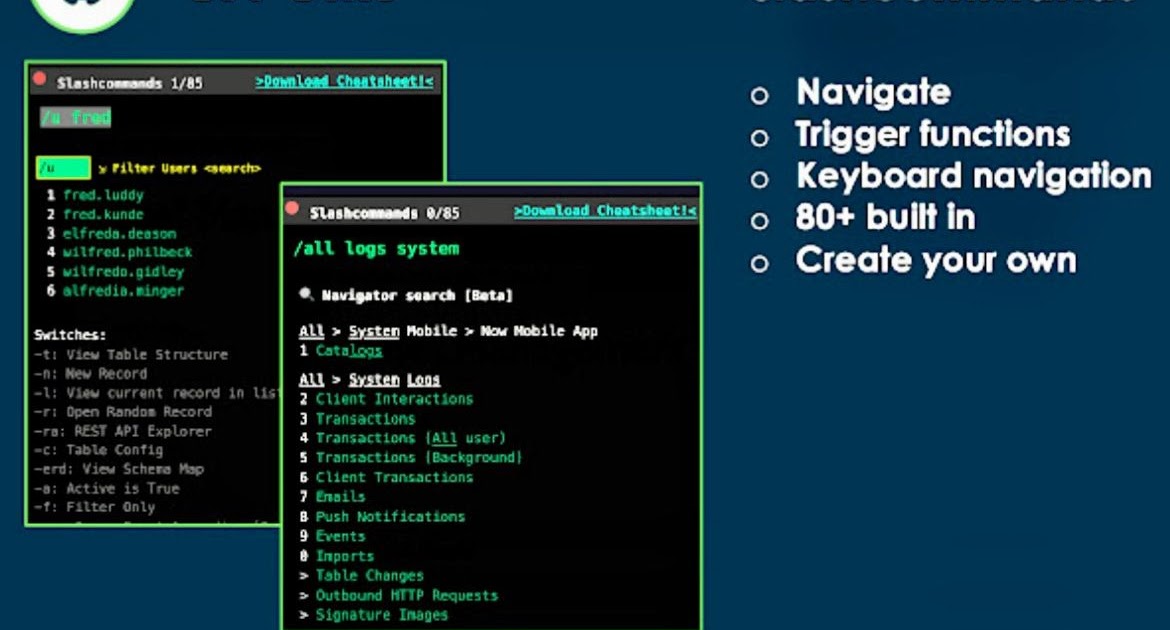

SN Utils Slashcommands
Using a powerful Chrome add-on extension for ServiceNow called SN Utils by Arnold Kooi.A must-have for development/administration.
As a ServiceNow developer, using sn utils simplifies the process of opening various scripts like client scripts (accessible with /cs) rather than typing entire name client scripts from the left navigation. Additionally, for technical field names, you can right-click on each field to reveal its backend name, eliminating the need to type /tn with sn utils to display all backend field names.
Most used slash commands in ServiceNow:
/tn -to getall technical backed names for fields in form
/fd -open flow designer
/code myScriptInclude-work as script contains and it will give results
/syslog - ct - f- to get logs created on today
/sys_user enter -open user table(not only user /incident enter open incident table.
/sys_id -search any record with sys _id
/bg - open background script
/me -my user profile
/plug - filter plugins
/sp -open serviceportal
/tables -open sys_db_object.LIST
/uh-show hidden fields
/up -ui policy
/si-script includes
/br-business rules
/cs-client scripts
/ua -filter ui actions
/u abel-filter user
/imp -impersonate user
/xml open current record xml view
/versions -versions of current record
/incident -n -opens incident new record
/incident -ut -incidents updated today
/incident -ct -Incidents created today
/incident -un or cm(updated or created by me)
/incident -m -updated or created by me
/incident -ga or gd -group by ascending or descending
/incident -t -table backend
/incident -c-table config
/incident -erd -show schema map
Cheat sheet

Credits:
https://www.linkedin.com/feed/update/urn:li:activity:7157474274700591104/
https://www.dancovic.com/2024/01/sn-utils-slashcommands.html