
QuickLinks/Announcement/MyFrequently used apps configurations on Configurable AWS
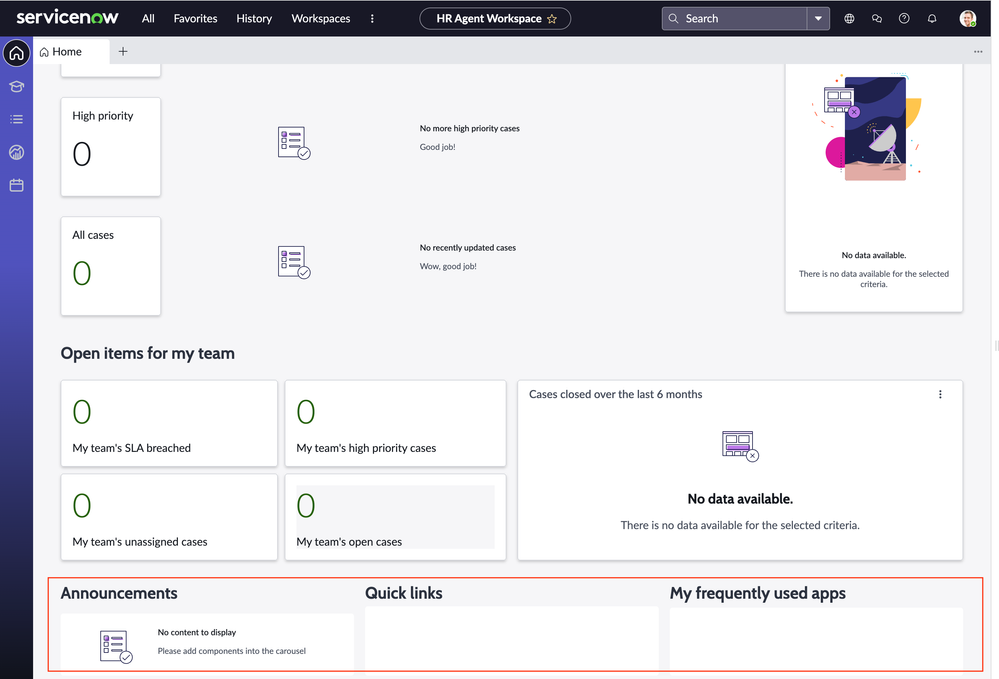
This article aims to walk you through how to configure Quick links in HR agent workspace. You will have similar data brokers for Announcements and My frequently used apps. Please note the steps in the article map to Vancouver release.
Persona: sn_hr_agent_ws.admin, sn_hr_core.basic is required at minimum to perform the steps below.
The content delivery section seen in screenshot below will be available only when Content Publishing plugin is installed.

To configure links in Quick links, you can do the following:
- Navigate to Content Publishing>Re-usable Content>Link Content and create a record with type as Link
- Navigate to Content Publishing> Schedule Content. Create a new record with either existing content or create a new one.
- For field Content, use an existing record and create a new record with the link field pointing to the record used in step1
- Select Content Location as UIB workspace.
- Component type as Quick Links
- Give a value to Content group field. (The value given here is the exact value that will be used in databroker)
- Submit
- For field Content, use an existing record and create a new record with the link field pointing to the record used in step1
- Navigate to UI builder for Agent workspace for HR case management, click on Landing Page. If you want to make a configuration, make a copy of the page.
- On the left pane you will find the data icon which provides the getQuickLinksContent databroker. For the content_id field provide the value you have given for the Content Group field in step 2 above. Its important for the value of content_ID field to be an exact match to the value in Content Group field.


This will then map the needed link to the Quick Link Component.
The main aspect of this is the records in schedule content table need to have the fields content type, content group and content location should reflect the type, the ID being used in databroker and UIB workspace respectively.

Similar steps need to be followed for the Announcements and My frequently used apps. The databrokers are getAnnouncementsContent and getMyFrequentlyUsedAppsContent respectively. The product documentation will give you more details on creating re-usable content.
Ensure to mark this page variant as default or higher order (lower value) than the default OOB page variant.
Please note: The order field on the page also accepts negative values.
https://www.servicenow.com/community/hrsd-articles/quicklinks-announcement-myfrequently-used-apps-configurations-on/ta-p/2713782