
Part 8: Domain Paths
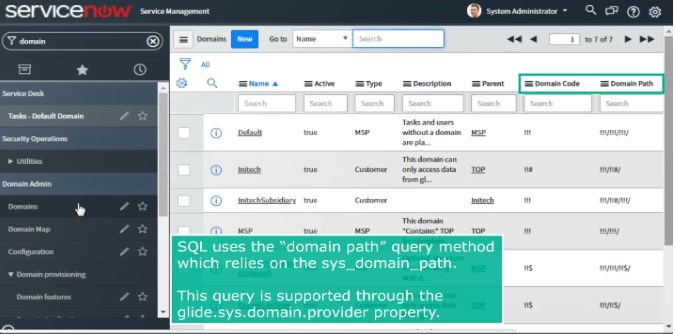
In order to find and retrieve data for a domain, SQL uses the “domain path” query method which relies on the values of the sys_domain_path. This query is supported through the glide.sys.domain.provider property.
To enable the domain path query method to work, there are two extra columns in the Domain table called Domain Code and Domain Path. Domain-separated tables have the Domain Path column, in addition to the ‘sys_domain’ column. Process-separated tables have both these columns plus the sys_overrides column.
A Domain code is a system generated series of 3 character codes corresponding to a specific domain record, and a domain path is this code prefixed with the immediate parent’s paths domain codes separated by a slash. The sys_domain_path value is unique in the Domain table. To find data for a particular domain, the system runs queries using that domain path value. Using Domain Paths, queries are generated automatically from the domain and these queries are always being re-calculated.
For example, suppose a user is logged into an instance and their user profile record is assigned to the INITECH domain. When the Task table is accessed, the system builds a domain path query in the background in order to filter and pull the data from INITECH domain and all of the child domains under it in the hierarchy. The query is essentially telling the system, ‘Select all tasks where the domain path starts with “!!!/!!#/!!!/” ‘ The system then searches for all records in the domain and subdomains to populate the Task table.
Here is an illustration of domain hierarchy and associated paths.
In order for domain paths to work, the value of a domain path in a domain-separated table must match its path value that is listed in the Domain (system) table. When domains are configured, the system configures the paths and populates the domain paths in domain separated tables based on the domain path value in the system domain table.
Under certain scenarios, domain path issues can arise when a record is created in a separate domain than the domain of the currently logged in user, causing the system to put the wrong domain path in the record. Domain path errors can also arise when users manually change the domain paths or the path does not get populated correctly, for example if the domain separated table’s data was imported from another instance where the domain paths were different or even the domain table data.
https://medium.com/@LearnITbyPrashant/part-8-domain-paths-f255baee84f6?source=rss-d005fc598f0a------2