
Hide Activity tab in HR tasks in Service portal
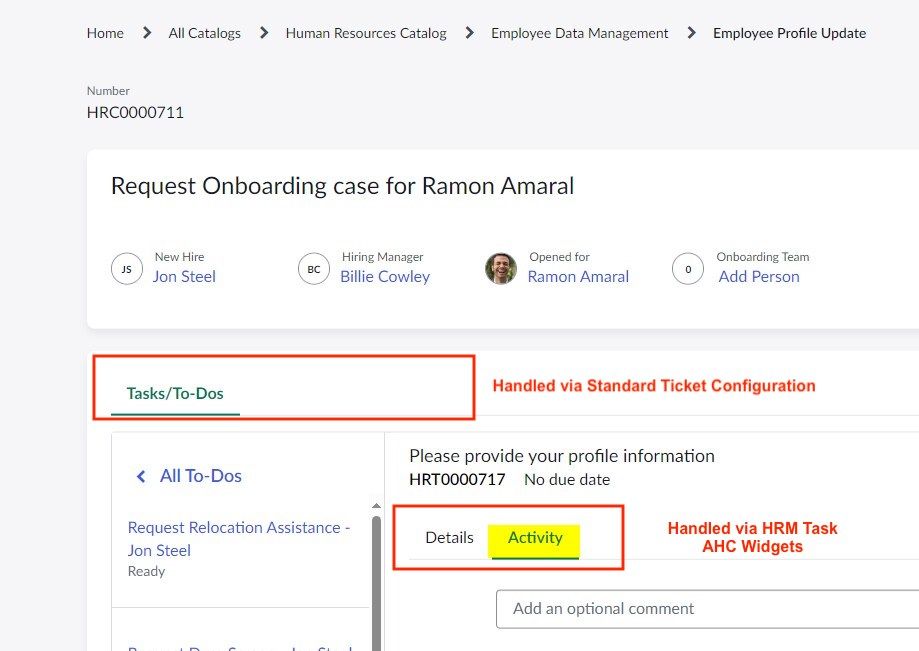
Today came across another interesting question where the questioner wanted to hide the Activities tab on HR Task. He mistook Standard Ticket Configuration with the configuration of tabs shown on HR Task details inside the Task/To-Dos tab on HRM Ticket page.

In order to hide the tabs of HR Task, you need to apply the following changes.
1. Navigate to HRM Task AHC Widgets available inside Service Portal >> Widgets
2. Set the application scope to Employee Center Core
3. Navigate to Client Controller
4. On line number 50 set display:false;
Refresh the page and check Activity tab should no longer be visible.


Caution: Please be informed that this is going to be a customisation in an OOTB widget which might get skipped during upgrade. Please apply this change if it is absolutely necessary.
Hope this helps
https://www.servicenow.com/community/hrsd-articles/hide-activity-tab-in-hr-tasks-in-service-portal/ta-p/2691351