
Operational Resource Plan to track actual hours and costs for incidents / changes
Operational Resource Plan to track actual hours and costs for incidents / changes
This article describes best practice to track actual hours and costs for operational work (incidents / changes) leveraging Operational Resource Plans.
This use case is based on the use of Timesheet Portal and Timecards, not Time Worked.
1 - Create operational resource plans to allocate people to operational activities (in this case, KTLO)
For more details about Operational Resource Plan, please refer to this article: Operational Resource Plan - All That You Need to Know
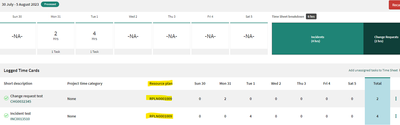
2 - When user is entering time to an incident/change request, select an available operational resource plan (operational resource plan on which the user is allocated and covering the timesheet week)

3 - The time card is associated to the Incident and operational resource plan. View from operational resource plan form:

4 - Once the time card is approved:
4. 1 - Actual hours and actual costs roll up to resource allocation

4.2 - Actual hours and actual costs roll up to the operational resource plan

https://www.servicenow.com/community/spm-articles/operational-resource-plan-to-track-actual-hours-and-costs-for/ta-p/2664923