
How to Restrict Developers from Creating Artifacts on Specific Tables?
 New article articles in ServiceNow Community
·
Dec 13, 2024
·
article
New article articles in ServiceNow Community
·
Dec 13, 2024
·
article
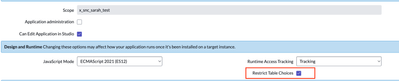
When developing applications on the ServiceNow platform, mainly using App Engine, it is critical to maintain governance over the artifacts developers create. A recurring challenge is restricting developers from creating artifacts such as business rules, reports, client scripts, and so on that interact with tables outside the scope of the application on which they are authorized to work.
The Restrict Table Choices functionality was introduced to address this specific issue. It allows platform administrators to restrict the tables developers can view or access when creating artifacts for a particular application.
Enable Restrict Table Choices:
- In the ServiceNow Studio, open the application you want to configure.
- Navigate to the Application Access section of the application's table and enable the Restrict Table Choices option.

Before activating the Restric Table Choice (Business Rules Scenario):

After activating the Restric Table Choice (Business Rules Scenario):

Benefits of Restrict Table Choices
- Enhanced Security: Developers can only create artifacts interacting with authorized tables, minimizing the risk of improper data handling.
- Robust Technical Governance: Clear restrictions simplify maintenance and reduce the technical complexity of the application.
- Compliance with Access Policies: Helps ensure the platform meets security and compliance requirements.
- Improved Development Efficiency: Limiting table choices allows developers to focus exclusively on relevant artifacts, increasing productivity and reducing errors.
https://www.servicenow.com/community/virtual-agent-nlu-articles/how-to-restrict-developers-from-creating-artifacts-on-specific/ta-p/3127258