
Keeping your instance database footprint tidy (03): Activating/adding Table Cleaners
 Mark Roethof
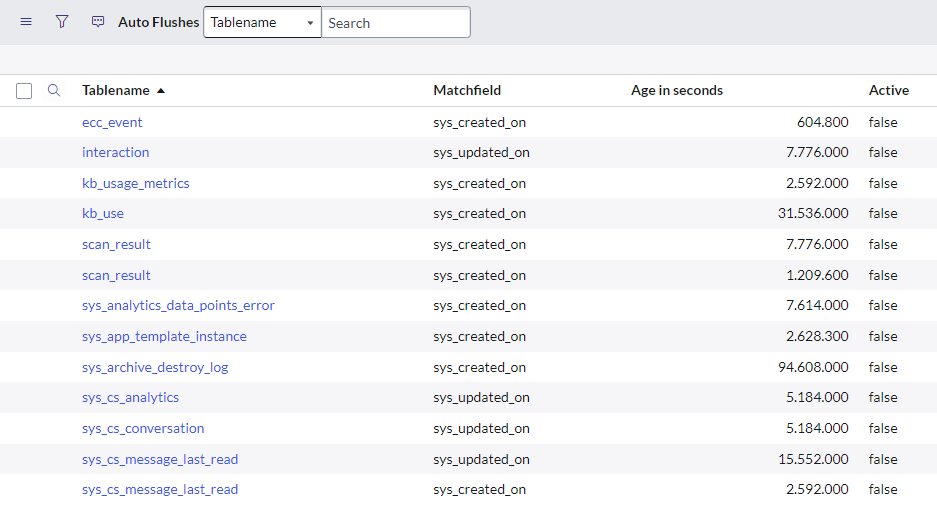
ServiceNow considers these Table Cleaners to be legacy and can be ignored. Personally I would deactivate them from a manageability point of view.
Inactive out-of-the-box inactivate Table cleaners
Besides the 200+ active Table cleaners which come with a fresh out-of-the-box ServiceNow instance on the Utah release, there are also several inactive Table cleaners.

- Activating "ecc_event" won't do anything, ecc_queue is on Table rotation.
- "interaction", "sys_cs_analytics", "sys_cs_conversation", and "sys_cs_messages_last_read" are described on the Docs 1 / Docs 2 consider activating these.
- "kb_usage_metrics" and "kb_use" are described on the Docs, consider activating these.
- "scan_result" has to do with Instance Scan. In my opinion should simply be activated.
For some of the out-of-the-box inactivate Table cleaners I didn't found any documentation so far. Therefore can't share anything on these:- sys_analytics_data_points error- sys_app_template_instance
- sys_archive_destroy_log
Out-of-the-box inactive Table cleaners added when plugin installed
As mentioned out-of-the-box there are hundreds of active and inactive Table cleaners provided. When activating plugins new Table cleaners might be added, active ones though also inactive ones. There's no extensive list on this, though I will mention a few examples here.
Glide Virtual Agent [com.glide.cs.chatbot]
Activating the Glide Virtual Agent plugin will add two new active Table cleaners.
Advanced Work Assignment [com.glide.awa]
Activating Advanced Work Assignment (or a plugin that includes Advanced Work Assignment) will add four new active Table cleaners. Also five new inactive Table cleaners will be added:- awa_agent_channel_availability- awa_agent_presence- awa_document_size- awa_work_item
- interaction_json_blob

All of these inactive Table cleaners are mentioned on the Docs, consider activating these.
Discovery [com.snc.discovery]
Activating Discovery will add 52 new active Table cleaners. Also one new inactive Table cleaner will be added:
- discovery_log
When activating this Table cleaner, it will clean up Discover Log records created more than 30 days ago.
Recommended "custom" Table cleaners
Don't immediately stumble on the word "custom"  Some are recommended by ServiceNow, some are based on my experiences in the past few years. It's definitely not an extensive list. You might have some good nuggets to add!
Audit Relationship Changes [sys_audit_relation] and Audt Deleted Records [sys_audit_delete]
Two recommended Table cleaners by ServiceNow that I've also mentioned in the first blog in this series. These would maintain two of the largest tables in any ServiceNow instance. For a specific customer, this was even over 3.8 terabytes in total and reduced to only 74 gigabytes.
On a new instance Table cleaners for these two tables should be added immediately. Though so far I have seen this at zero customers where I entered. Not strange, knowing that the main focus is Development and Implementations, not Operations. Also we can just be honest, knowledge of Operations is limited at customers and also Partners hardly have any knowledge on this subject.
sys_audit_relation
Suggested Matchfield: sys_created_on
Suggested Age in Seconds: 0
Suggested Conditions: auditISNOTEMPTYaudit.sys_idISEMPTYaudit_deleteISEMPTYNQaudit_deleteISNOTEMPTYaudit_delete.sys_idISEMPTYauditISEMPTY
sys_audit_delete
Suggested Matchfield: sys_created_on
Suggested Age in seconds: 15.552.000
Route Status [sn_capi_route_status], Order Step Graph [sn_cmp_order_step_graph_edge], and Cloud Orchestration [sn_cmp_order]
Customers having Cloud Provisioning and Governance are recommended to create Table cleaners for tables Route Status, Order Step Graph, and Cloud Orchestration. "These tables store tracing and troubleshooting information for each discovery or provisioning that is made on cloud resources. This information accumulates if many discovery schedules are set up on an instance or if discovery is attempted many times. Additionally, this information is dated and is of less relevance beyond 30 days."
Report Summary Line [sys_report_summary_line] and Report view [report_view]
These two tables were mentioned in a ServiceNow KB article, though recently the KB article was made unavailable  . Luckily I do have some snippets!
Report Summary Line: "This table holds data related to custom charts. When the system builds a custom chart, it dumps data into this table such as chart colors and the like. The data stored in this table is just temporary data and can be completely wiped out. This cleanup frees up space in DB and in turn helps improve performance when accessing any other large tables, such as cmdb_baseline_entry. Consider having it on Table Cleaner for 30 days."
Report View: "This table tracks the reports of who has viewed what and when, and might also cause performance issues as reports are running (especially on any home pages as well). This data is not necessary to keep. Consider having it on Table Cleaner for 30 days."
Record History [sys_history_set]
This Table cleaner is active out-of-the-box. Due to "Cascade delete" not being true, this Table cleaner causes orphaned records on the History table [sys_history_line]. ServiceNow did have a KB article about adding a Table cleaner for the History table, though in my opinion the Record History Table cleaner simply needs to be updated instead. ServiceNow Support does not agree and simply mentions, there's table rotation on History which will cleanup the orphaned records.

Do be aware: updating this Table cleaner, won't clean up existing orphaned records. You need to handle this yourself as a one-time cleanup.
ML Update Set [ml_update_set]
This Table cleaner is active out-of-the-box. Due to "Cascade delete" not being true, this Table cleaner causes orphaned records on the Attachment table [sys_attachment]. ServiceNow has confirmed that the orphaned ML Update Set related attachments is fixed in the Vancouver release, though since that's not yet available I can't confirm myself and if ServiceNow actually updated this Table cleaner or went for a different solution. For customers having Predictive Intelligence solutions running, this can be a large one, in the tens or even hundreds of GBs of orphaned Attachments which should be cleaned up.

Do be aware: updating this Table cleaner, won't clean up existing orphaned records! You need to handle this yourself as a one-time cleanup.
ML Model Store [ml_model_artifact]
When looking closely at the ML Model Store records, you might have noticed the Solution field. When the Solution is inactive, the related ML Model Store records are basically useless. While the ML Model Store records will only be a few hundred or a few thousand records, the impact of maintaining these is a lot bigger: it's not uncommon for ML Model Store records to contain Attachments of tens or hundreds of gigabytes.
Suggested Matchfield: sys_created_on
Suggested Age in Seconds: 0
Suggested Conditions: solution.active=false
Attachment Documents [sys_attachment_doc]
Attachment Documents without a valid parent Attachment record do occur. You can argue if a Table cleaner should be set up for this. A Table cleaner would automatically maintain any Attachment Documents without a valid Attachment record, which can save you a lot of Database Footprint. Though automatically maintaining such records, might also cause you not to spot an issue on some incorrect development done which might actually cause Attachment Documents without a valid Attachment record.
Suggested Matchfield: sys_created_on
Suggested Age in Seconds: 0
Suggested Conditions: sys_attachmentISNOTEMPTYsys_attachment.sys_idISEMPTY
Tiny URL [sys_tiny_url]
Out-of-the-box there's no Table Cleaner or something similar in place for the Tiny URL table, and since Tiny URL records are created automatically rapidly, the table can grow fairly large. Most of the records in the Tiny URL table are only used once, when the record got created, and do not add any value to your instance.
Suggested Matchfield: last_accessed
Suggested Age in seconds: 15.552.000
Update Set Logs [sys_update_set_log]
When displaying an Update Set Source, you will notice millions of records on the related list Update Set Logs. This information is dated and is of less relevance, I would say already beyond 30 days.
Suggested Matchfield: sys_created_on
Suggested Age in seconds: 2.592.000
User related tables
There are several tables within ServiceNow that hold supporting system records for users. When users are not active anymore, most of these records lose their value. Cleaning up such records won't do much for some tables, though for other tables it can be millions of records. Another plus is when maintaining such tables you won't accidentally be looking at outdated data, and when having the table optimized they simply perform better. I would suggest considering looking into tables like the below ones and if adding Table cleaners is possible.
- cmn_notif_device- sc_cart- sys_filter- sys_template- sys_ui_bookmark- sys_ui_bookmark_group- sys_ui_navigator_history- sys_ui_recent_selection- sys_user_preference
- user_multifactor_auth
Suggested Matchfield: sys_created_on
Suggested Age in Seconds: 0
Suggested Conditions: user.active=falseuser.last_loginRELATIVELT@month@ago@6ORuser.last_loginISEMPTY
Result
After applying all these Table cleaners, what the result will be... hard to tell, it will differ for every customer! Though at least a few of the biggest tables in any ServiceNow instance will be cleaned up, and more importantly: automatically maintained. And that's probably the most important for all of the tables involved with the Table cleaners: they are automatically maintained. The visible part will be a reduction in Database Footprint which can be several terabytes. Maintaining the tables will also help eventually when doing any maintainability activities, or tables can also be optimized (or some automatically will if the Table cleaner initially cleans up over 50%) which will free up space, will make the tables faster, etcetera.
Share
An Update Set with this Topic Block can be downloaded from Share:
- Activating/adding Table cleaners
---
That's it. Hope you like it. If any questions or remarks, let me know!
Kind regards,
Mark Roethof
Independent ServiceNow Consultant
4x ServiceNow Developer MVP
4x ServiceNow Community MVP
---
https://www.servicenow.com/community/now-platform-blog/keeping-your-instance-database-footprint-tidy-03-activating/ba-p/2629014