
CMDB Query used on Dynamic CI Group returns more CIs than expected
Hi SN Community!
Sometimes you need to create a Dynamic CI Group filtering relationships between different CMDB classes in order to get some specific CIs. In that case
you need a previously saved CMDB Query, as the CMDB encoded queries are not an option because they do not allow relationships to be defined.
The issue comes when you add the previously saved CMDB query to the CMDB Group defined on the Dynamic CI Group, as it returns more CIs than when you run it directly on the CMDB Query Builder.
Let's see one example and the possible workaround:
THE ISSUE
Note: issue faced in Utah release.
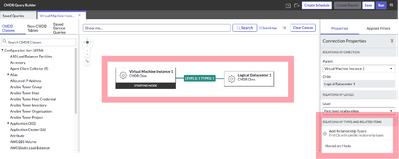
- Define the query on the CMDB Query Builder, getting the Virtual Machine Instances which are hosted on Logical Datacenters:
- Run the query and get the number of CIs, they are 12 in this particular case, all of them Virtual Machine Instances:
- Create the Dynamic CI Group, an associate a new CMDB Group to it:


- Set the previously saved query on the newly created CMDB Group:
- Go back to the Dynamic CI Group, click on "View CMDB Group CIs" button and check the CIs contained in the group. There are 12 VM Instances but also 4 Datacenters which should not be there. The list contains 16 records:


THE SIMPLE WORKAROUND
- Change the way you build the query on the CMDB Query Builder, instead of bring to the canvas both tables, bring only the one you need CIs from and establish the relationship via the Filters on Related Lists:
Note: Be sure you are also adding a condition on the starting node table and not only on the Related List, as there could be some unexpected behaviour if you only set the filter on the second one. - The new query returns the same result via CMDB Query and Dynamic CI Group, listing only the Virtual Machine Instance CIs:


THE ADVANCED WORKAROUND
The simple workaround solves the issue when you have a simple query, but what happens when you have more than one relationship in the query? Then we have to go for another solution.
As you know, the DCIG is based on a CMDB Group, which can be populated with CIs in three different ways: Saved Queries, Encoded Queries or directly mapping CIs. The Encoded Queries are not an option in this case because we have a complex query with different relationships, and the Saved Queries do not work because they are mapping all the CIs included in the relationships instead of only the ones coming from the starting node. So, at the end we can only use the third method, mapping CIs manually.
Ok, use that method, but automatise it!! We can create a schedule job to query the Saved Query and populate the CIs on the CMDB Group automatically. So, the CIs will appear as manually added in the "CMDB Group Contains Configuration Items" CMDB Group related list, but will be mapped by a scheduled job. At the end, this method is like the OOTB using a Saved Query, but we directly query the Saved Query and get only the CIs from the starting node and then map them into the CMDB Group as if they have been mapped manually.

System Properties
sn.cmdb.dynamiccigroup.custom_mapping.active
[true/false] Enable or disable the custom mechanism to map CIs on the desired Dynamic CI Groups, with CIs coming from the saved query with the same DCIG name.

sn.cmdb.dynamiccigroup.custom_mapping.ids
[string] Sys Ids of the Dynamic CI Groups which need to contain only CIs from the starting node coming from the saved query. Add more Sys Ids separated by commas.

sn.cmdb.dynamiccigroup.custom_mapping.log
[true/false] Enable or disable the logs on the custom mechanism to map CIs on the desired Dynamic CI Groups.
Scheduled Job
Name: PREFIX - Dynamic CI Group Custom Mapping
Active: true
Conditional: true
Condition:
JSUtil.toBoolean(gs.getProperty('sn.cmdb.dynamiccigroup.custom_mapping.active', 'true'));
Run this Script:
mapCIsToDynamicCIGroups();

// Map CIs from the starting node of the saved query to the Dynamic CI Group
// OOTB SN is mapping records from all the tables involved in the saved query
// This custom method only maps the ones which are related to the starting node
// The Dinamy CI Groups mapped here are the ones included on the "sn.cmdb.dynamiccigroup.custom_mapping" system property
// Note: the name of the Dynamic CI Group and Saved Query should be the same
function mapCIsToDynamicCIGroups() {

    try {

        // Get all Dynamic CI Groups Sys Ids from system property
        var allDynamicCIGroups = gs.getProperty("sn.cmdb.dynamiccigroup.custom_mapping.ids");

        // Initialize log
        var logMessage = 'Secheduled Job: Dynamic CI Group Custom Mapping';

        if (gs.nil(allDynamicCIGroups))
            return false;

        var arrayDynamicCIGroups = allDynamicCIGroups.split(',');

        logMessage += '\n\nDynamic CI Groups('+arrayDynamicCIGroups.length+'): ' + allDynamicCIGroups + '\n\n --- \n';

        for (var i = 0; i < arrayDynamicCIGroups.length; i++) {

            var dynamicCIGroupGR = new GlideRecord('cmdb_ci_query_based_service');
            if (dynamicCIGroupGR.get(arrayDynamicCIGroups[i])) {

                // Get the Saved Query with the same name than the Dynamic CI Group
                var savedQueryGR = new GlideRecord('qb_saved_query');
                savedQueryGR.addQuery('name', dynamicCIGroupGR.getValue('name'));
                savedQueryGR.query();
                if (savedQueryGR.next()) {

                    // Initialize the starting node
                    var startingNode = '';

                    // Get the Starting Node from the Saved Query
                    // All query info is stored in the "Query" field as a JSON
                    var jsonV = JSON.parse(savedQueryGR.getValue('query'));
                    var iLength = jsonV.nodes.length;

                    for (var h = 0; h < iLength; h++) {
                        if (jsonV.nodes[h].isStartNode) {
                            // Get the Starting Name and transform
                            // to get the field name in which it is going to be stored in the result_table
                            startingNode = 'u_' + jsonV.nodes[h].name.toLowerCase().replaceAll(' ', '_');
                            break;
                        }
                    }

                    var lastQuery = '';
                    var previousCI = '';
                    var counter = 0;
                    var resultCIs = [];

                    // Important: Execute the saved query in order to refresh the CIs returned by the saved query
                    SNC.CMDBQueryBuilderAPI.getSavedQueryExecutionDetails(dynamicCIGroupGR.getValue('name'), true);

                    // Iterate the results on the saved query result_table
                    // and get the last query unique CIs for the Starting Node
                    var newQuery = new GlideRecord(savedQueryGR.getValue('result_table'));
                    newQuery.orderByDesc('sys_created_on');
                    newQuery.orderBy(startingNode);
                    newQuery.query();
                    while (newQuery.next()) {

                        if (counter == 0)
                            lastQuery = newQuery.getValue('query');

                        if (lastQuery != newQuery.getValue('query'))
                            break;

                        if (previousCI != newQuery.getValue(startingNode))
                            resultCIs.push(newQuery.getValue(startingNode));

                        previousCI = newQuery.getValue(startingNode);
                        counter++;

                    }

                    // Get CMDB Group from Dynamic CI Group
                    var cmdbGroupGR = dynamicCIGroupGR.getValue('cmdb_group');

                    // Remove CIs assigned to the CMDB Group used on the Dynamic CI Group
                    var deleteCIsOnCMDBGroup = new GlideRecord('cmdb_group_contains_ci');
                    deleteCIsOnCMDBGroup.addQuery('group', cmdbGroupGR);
                    deleteCIsOnCMDBGroup.query();
                    deleteCIsOnCMDBGroup.deleteMultiple();

                    // Add the CIs to the CMDB Group used on the Dynamic CI Group
                    for (var j = 0; j < resultCIs.length; j++) {
                        var newCIOnCMDBGroupGR = new GlideRecord('cmdb_group_contains_ci');
                        newCIOnCMDBGroupGR.setValue('group', cmdbGroupGR);
                        newCIOnCMDBGroupGR.setValue('configuration_item', resultCIs[j]);
                        newCIOnCMDBGroupGR.insert();
                    }

                    logMessage += '\nFor the "' + dynamicCIGroupGR.getDisplayValue() + '" Dynamic CI Group, the following CIs have been added: ' + resultCIs.join(',');

                }

            }

        }

        // Print log if it is active on the system property
        if(JSUtil.toBoolean(gs.getProperty('sn.cmdb.dynamiccigroup.custom_mapping.log')))
            gs.info(logMessage);

        return true;

    } catch (e) {
        gs.error("Scheduled Job - SN - Dynamic CI Group Custom Mapping: " + e);
        return true;
    }
}
Considerations: This schedule job could take a lot of time to be executed, depending on the number of DCIG you have to map and the number of CIs to be included. It could end in a timeout or impact the instance performance. So it is not recommended if you need real time data and the job has to be executed at short intervals, but could work if there are not too many DCIGs to be mapped or if it is valid to refresh them daily. Be sure you check/test it carefully and based on your production data volume.
Improvements: If you have to map a lot of DCIG, or they include a lot of CIs, it would be needed to paginate the queries in order to do not end on a timeout, nor impact instance performance. Other improvements can be made to the code, I will update if I have the time.
_________________________
On this way, we can return the subset of CIs we want, based on the relationships we want or any other condition applied on filters on different tables (Relationships, Child, SN Alert, etc). If you can imagine it, you can build it (and now you can use it also in the Dynamic CI Group  )!!
)!!
Hope it helps!
Kind regards,
Luis Estéfano

https://www.servicenow.com/community/developer-articles/cmdb-query-used-on-dynamic-ci-group-returns-more-cis-than/ta-p/2597546