
How to rollback your modifications made by FiX script or Background Script
Recently I was working on a requirement where I needed to write a script to remove specific users from their respective groups and remove all of their roles (given directly to them without any group) and only assign 'snc_internal' role to them.
I did not know that I was going to run into deleting the roles of all the users in DEV instance because of one wrong query. However, I was lucky enough that it did not delete my admin role (I think I was the executor of that script that's why, or it is still a mystery to me  ).
).
I ran the script at the end of my day and went to sleep nicely, got to know about this when my team tried to login to DEV instance next day and they were not having admin access. I quickly checked my script and found that it ran for hours together and deleted everyone's role except mine.
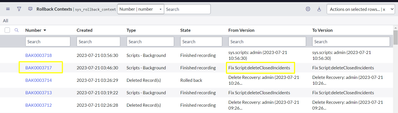
I panicked and started thinking what should be done now. My teammates were suggesting that they will perform a clone from PROD to restore everyone's role. I was blank and not understanding what to do. But later after research for sometime, I figured that I can rollback my script, and after seeing this my eyes glittered and I quickly looked into 'sys_rollback_context' table and found my fix script for rollback.
Steps to rollback your script
In order to verify that you are rollbacking the correct script, you can filter it in 'From version' field on 'sys_rollback_context' table. It will show 'Fix Script:'. You can only rollback the scripts which are in 'Finished Recording' state. If the state is expired then it can't be rollbacked.
Note: Below screenshots are from my PDI and do not contain the exact script records.

Once you found your script which needs to be rollbacked. Open the record and click on 'Rollback' related link.

Post this you will get a pop up 'Execute Rollback?'. Select 'yes' in that and click 'OK'. You will see the progress of rollback and once completed, click on close. And your rollback is successful.

Note: There are some other ways to recover your scripts or perform rollback and delete recovery. You can look for below document for the same. This will not help in case of Fix scripts.
I hope this article will help others who faces the same issue. Please mark it helpful and bookmark it for future reference if you feel so.
Regards,
Mohit Kaushik
ServiceNow MVP (Dev and Community)
Labels:

https://www.servicenow.com/community/developer-articles/how-to-rollback-your-modifications-made-by-fix-script-or/ta-p/2620304