
Understanding Scheduled Job Workers
 Allen Andreas
Understanding Scheduled Job Workers
For scheduled jobs within the #ServiceNow platform, did you know that there are 3 types of workers that process the jobs each node claims? Each node has its own "Background Scheduler" which claims up to 20 jobs at a time and puts them in the "Scheduler Queue".
The 3 types of workers that work that queue are:
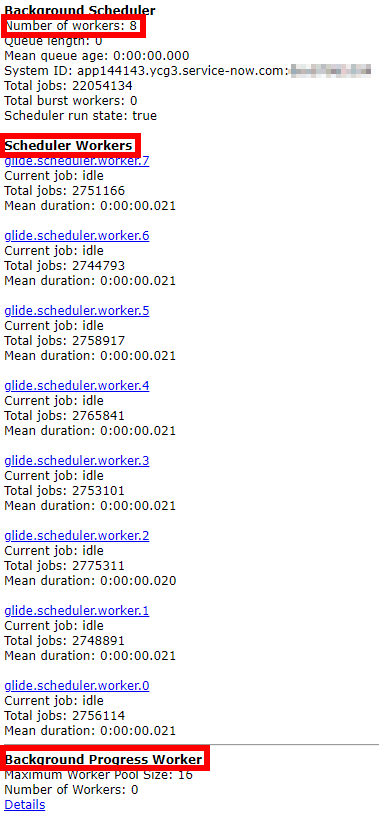
- Scheduler Worker - each node has 8 of these to process jobs within the Scheduler Queue (scheduler workers are also threads and are numbered 0-7)
- Burst Worker - This is a special 9th worker thread that is only used under specific scenarios to ensure the most critical jobs do not get delayed. For a job to run on the Burst Worker it must have a priority of <=25 and have been queued for 60 seconds (meaning there's a delay and it has been sitting there)
- Progress Worker - These run on scheduler threads and are designed to handle long running jobs where we want to display the progress/percentage in the UI (use cases such as: upgrades, plugins, update sets, etc.). By functioning as a "wrapper" around the job, this allows it to provide updates on the activities it's conducting back to you in the UI to keep you informed of the status.
You can see the current details of the workers related to the node you're on by visiting the "stats.do" page. You'll then want to scroll down a bit to see the related information. Here's an example of what you'll see:

Do you have any interesting facts or tips you want to share related to ServiceNow scheduled job workers? Feel free to comment below and let us know your thoughts!
If you enjoy ServiceNow content like this, please visit and consider subscribing to my ServiceNow focused YouTube channel: Allenovation!
https://www.servicenow.com/community/developer-articles/understanding-scheduled-job-workers/ta-p/2602616