
DEX - Desktop Assistant product overview
Desktop assistant (DA) is a stand-alone self-service app. It is designed to improve user engagement with notifications and inbuilt virtual agent support capability. It's a powerful tool that can be easily configured and takes only few minutes to get installed and deployed across end-user devices. This application simplifies the process of integrating ServiceNow functionalities into your daily workflow by providing easy access to a set of rice features provided OOB including search, network test, outages, my requests, create request, notifications, virtual agent integration and a dashboard to provide key insights to dex-admin.
Supported Personas
DEX admin [sn_dex_desktop.admin] - Responsible for managing configurations and resolving any issues that may arise within the application.
DEX user [sn_dex_desktop.user] - Responsible for using Desktop Assistant. User does not have the ability to configure any items within the application.
How to get this application?
Application can be purchased via store - DEX Desktop Assistant (sn_dex_desktop)
Required plugin - ServiceNow ITOM SU Licensing (sn_itom_licensing)
Optional plugin for virtual agent integration - Glide Virtual Agent (com.glide.cs.chatbot)
VA integration is configurable on desktop assistant, admins can turn it on/off based on their organization requirements. If enabled, desktop assistant users will be able to chat with servicenow virtual agent and view topics configured by their admin from the app directly.
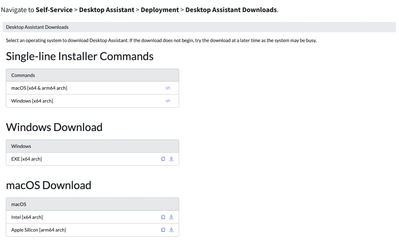
Download the application - Once the application is purchased from store app and related plugins are activated, there are 2 different options available here. You can always download the file directly that matches your device OS from the downloads page or you can also execute the installer commands to download Desktop Assistant for the corresponding operating system. Currently supported on both mac and windows.

Configuring the application - Configuring the desktop assistant application is easy. There are 2 sections created OOB, you can always add new sections or map your cards to one of the existing sections using left nav modules.
Also you can add new cards or modify OOB provided cards to meet your organization requirements. Remember to always make sure each of the cards are mapped to a section in-order for them to be visible on desktop assistant app.

Using the application
The application once installed, is available in the menu bar. Users will be asked to login using their credentials for servicenow instance. The login mechanism is powered by OAuth, we do provide SSO support and this can be configured by admins on the instance. Users will have access to al the cards configured by their administrator. User will be able to see all notifications (new and read), create requests, Run network speed test, view list of outages and navigate to employee portal from the application.

In addition to above capabilities, DEX DA admins also have access to desktop assistant dashboard where they will be able to see some key insights related to product usage.
https://www.servicenow.com/community/itom-articles/dex-desktop-assistant-product-overview/ta-p/2600894