
Technology Portfolio Management - Getting Started
Technology Portfolio Management (TPM) is ServiceNow’s Application Portfolio Management facility that allows Enterprise Application teams to align the technology components that make up these systems and understand/visualize the manufacturer / publisher support lifecycles in order to understand Technology Obsolescence risks.
In the May '23 Store release, the APM team here at ServiceNow has released a brand new TPM facility and process. The new TPM is shown in the new Enterprise Architecture Workspace and will be our direction for technology alignment and obsolescence risks management going forward.
The following links are recordings of workshops we here at ServiceNow have held to introduce the concepts and detail how Technology Portfolio Management works.
Workshop Deck (pdf format) is attached below
This post is meant to provide information beyond the product docs on details of TPM implementation for either the original TPM or the new TPM.
The original TPM is fairly well documented in Mark Bodman’s original article:
Technology Portfolio Management made easy
For installation, it is installed upon activation of the APM plugin so if you install APM, you have TPM.
Once it is installed the following data model is utilized:

Simply put, the Software / Hardware Model represents a “version” of the particular product in use by the Application Service (deployment of a Business Application).
Manage Technology Models
The Original TPM includes a means to utilize the information gathered and coordinated by Discovery – Software Asset Management – Service Mapping to semi-automate the determination of the software and hardware alignment of traditional and even cloud deployed applications.
Steps:
- Open a business application OR right click on a business application in All Business Application list view and click Manage Technology Models.
- On the Application Services list that is opened, right click the designed Application Service and select Fetch Product Models.

Choose the appropriate options, specifically Hardware only or both Software and Hardware. The Force check option governs if the process will rerun prior analysis. It will "crawl" all of the application service associated hardware.
3. Once complete, open the Application Service and in the Retrieved Software Models tab, select the applicable Software Models and then select Associate Software Models to create Application Service Software Model records.


Note that Software Models can be manually aligned to the Application Service by creating records in the Application Service Software Models related list.
The new Technology Portfolio Management feature of APM is being delivered via a ServiceNow Store application.
- From the ServiceNow Store request and activate the following Plugins:
- Application Portfolio Management Enterprise Architecture Workspace
- Technology Portfolio Management
- Application Portfolio Management Enterprise Architecture Workspace
Once installed, the new TPM Data model will be available:

Align Technologies
Within the new TPM, you may align technologies using the action from a Business Application record form in EA Workspace or, better yet, schedule the Populate TPM Discovered Technologies and Lifecycles scheduled job.
Technology Alignment Process detail
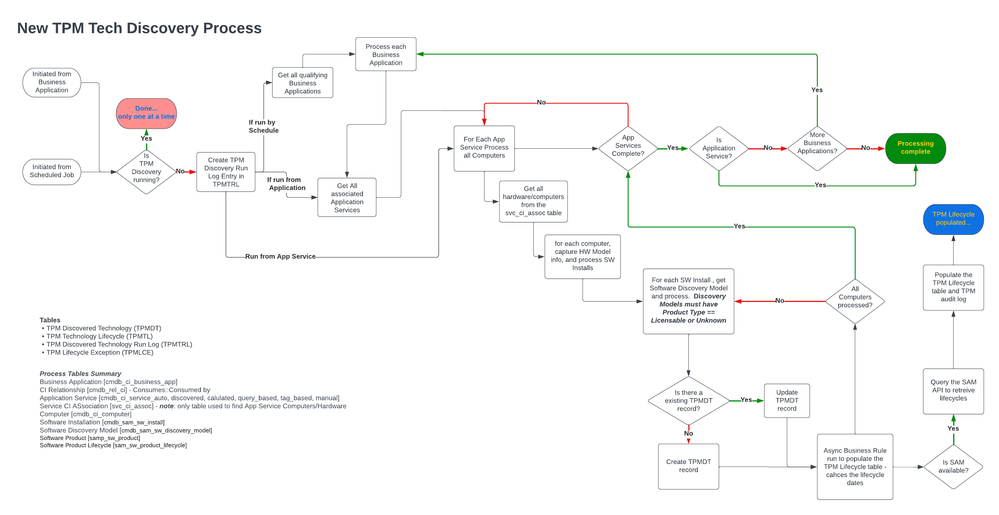
The general process is as follows for each Business Application:
- query and fetch the Consumes::Consumed by Application Services. NOTE: must be an Application Service (not a Service [cmdb_ci_service]) and these Application Service must be "mapped". That does not imply that you must have a full Top-Down Discovery Service Map defined although that is great if you do. You may also Calculated, Dynamic CI Group, Manual (manually added entry points), or Tagged based. The key is that Service Configuration Item Association [svc_ci_assoc] is populated for each Application Service and its Computers.
- For each Computer identified in svc_ci_assoc, evaluate the Software Installation table records. Also, if a Hardware Model is associated, we create a Hardware type TPM Discovered Technology record.
- For each Software Install, evaluate the reference Software Discovery Model. The Software Discovery Model(s) must be of a Product type Licensable or Unknown and they must ne normalized or manually normalized to get any appropriate information. NOTE: see the section at teh bottom of this article, you are now able to have good control over the selection of Software Discovery Models!
- For each valid Discovery Model, the job creates a new or updates a TPM Discovered Technology record.
- The creation of the TPM Discovered Technology record triggers the creation of an associated TPM Technology Lifecycles record which queries and caches the lifecycle information for the hardware or software technology.
Process Flow diagram (see attachments for a downloadable version)

For successful software alignment records, you must have the following tables populated:
- Business Application [cmdb_ci_business_app]
- CI Relationship [cmdb_rel_ci] - Consumes::Consumed by
- Application Service [cmdb_ci_service_auto, discovered, calculated, query_based, tag_based, manual]
- Service CI ASsociation [svc_ci_assoc] - note: only table used to find App Service
- Computers/Hardware Computer [cmdb_ci_computer]
- Software Installation [cmdb_sam_sw_install]
- Software Discovery Model [cmdb_sam_sw_discovery_model]
- Software Product [samp_sw_product]
- Software Product Lifecycle [sam_sw_product_lifecycle]
Hardware requires the Hardware Model reference on the Computer be populated.
Example setup of a demo or proof of concept data set
If you wanted to try this out in a system that did not yet have full Discovery, SAMP Pro etc here are steps (assumes you have full admin rights including security admin because you will have to change some acls):
- Create Software product(s)
- Create Software Product Lifecycles for above Software product
- Create or use an existing Business Application
- Create or use an existing Application Service associated to the Business App by a Consumes::Consumed by relationship and the Server(s) below must be "mapped" and showing in the svc_ci_assoc table.
- Create or select an existing Server. Could be Windows, Unix, Linux etc. (note, you will have to have proper privileges)
- From the Server(s) create Software Installation records for the Software Products you created.
- Create (should auto-create) Software Discovery Model record(s) for the Software Install records and insure they are normalized either auto or manually. Also, the Discovery Model must have Product Type equal to Licensable or Unknown.
You now have a path from Business Application -> App Service -> Server -> Software Install -> Software Discovery Model (normalized Software) by which the TPM analysis can create the proper TPM records. Launch TPM from either your Business Application or better, via the Scheduled Job.
Running the alignment Job on an individual Business Application
In EA Workspace, open a Business Application record and in the top right, click the ellipsis and select Update TPM Data.

This will launch a job/process for only this particular Business Application.

If the process is already running, you will see a warning that only one instance of the process can run at a time and you will have to try later.

You can examine the results in by navigating to the EA Workspace home, selecting Technology Portfolio in the Insights section and then click the View all technology lifecycle risks and filter the list to just the application(s) you are interested in.


Schedule or Launch the TPM Scheduled Job
The Populate TPM Discovered Technologies and Lifecycles job will analyze all business applications. To configure the TPM scheduled job:
- Navigate to System Definition > Scheduled Jobs
- Locate the Populate TPM Discovered Technologies and Lifecycles job.
- Open the record and set a schedule OR, launch the job manually.

You can track the progress of TPM analysis by examining the TPM Discovered Technology Run Log table. Each time the analysis is run, an entry is added to this table. Navigate to EA Workspace and click the Portfolios section on the far left. In the list of views, locate the Technology Portfolio Management section and click the Logs link.

The list view for the table will be shown. Note that if the process is launched from a Business Application, then the Business Application will be shown. If the job is run on schedule, nothing is shown in the Business Application column since it is run against all business applications.
Understanding potential discovery
Both the original and new TPM analysis allow for semi(original) and full automated (new TPM) discovery of technologies. The model for this discovery depends on
- Associated/Aligned Application Services
- Application Services are mapped (top-down, tag-based, dynamic etc.)
- Discovery + ITAM (SAM and HAM Pro)
- SAM/HAM Pro


The common denominator is that:
- Application Services are mapped to Servers
- Servers have application SW installation info
- SW Installation are normalized in Software Discovery Models
A Database view can be derived that allows you to “preview” this discovery. The example Database view below can be used to identify those discovery candidates.

For the original TPM Fetch Models, CMDB Query Builder as shown below can be used to identify potential software identification where CI Relationships are in use and the Application Services are not Mapped Application Services [cmdb_ci_service_discovered]. In this query, we allow the relationship between Application Service and Computer to be any relationship type so this support Depends on as well as Runs on.

Showing Software Product Lifecycles and how to debug
One of the issues we have seen are cases where using the original TPM and possibly even with the new TPM, lifecycles are not show for the associated technology. This can occur because the TPM system must execute a query to identify the lifecycles. In both old and new TPM, the query uses the Publisher, Software Product, Version. Edition and Full Version to try and identify a set of lifecycles.
The issues causing missing lifecycles can vary but understanding how lifecycles are queried can help.
| Original TPM | | New TPM |
| ------------------------------------------------------------------------------------------------------------------------------------------------------------------------- | | ------------------------------------------------------------------------------------------------------------------------------------------------------- |
| Uses Software Model to represent a “version” of Software Product | | Does not use Software Mode but instead expects to find the Publisher, Product, Version, Edition and full version on the Software Discovery Model record |
| SW Models can be “version-less” or version agnostic therefore all you get is the Publisher and Product. You MUST have a full version specified to find a lifecycle. | | Less likely that the Discovery model will be missing a version unless it has not been normalized. |
| Even with a full version, there may be no exact matching lifecycles. The SAM API tries to resolve this heuristically to find a best fit match. | | New TPM captures a TPM audit log record for cases where the heuristic is used to find a lifecycle. |
| You may have to add new Software Models to represent Software not found in the SAM content library. | | A later release of new TPM will include means to support addition of manually entered software and lifecycles. |
Creating Minimum Viable Application Services
As you may notice, it is critcal that you have Application Services and they are mapped to at least servers. In order for our TPM facilities to do their job in an automated manner, we require the Application Services to be "mapped". Specifically they are "configured" or managed in such a way that the Service Configuration Item Associations [svc_ci_assoc] table is populated.
Please see the following article for more information:
Creating Minimum viable Application Services to support Technology Portfolio Management (TPM)
Controlling the Sofwtare Discovery Models selected by TPM
The out of the box filtering can be updated and controlled. Instances on Vancouver or above can update to version 14.0+.
With that version, the system property, sn_apm_tpm.softwareDiscoveryModelProductFilterForTPM, can be supplied with an encoded query that will allow you to control which software discovery models are selected for TPM. See the docs here, Filter software results using an encoded query in TPM, and it describes the process.
In prior versions of TPM, you could access and update the system property, sn_apm.discoveryModelProductTypesForTPMSuggestions, to include “not licensable” but the downside of this approach is that you will likely get a large number of generally useless detail content such as “Microsoft Visual C++ 2013 Redistributable (x86) - 12.0.40660 12.0.40660.0”. The new version 14.0 encoded query allows better control.

https://www.servicenow.com/community/apm-articles/technology-portfolio-management-getting-started/ta-p/2593504