
AI Search Tuning - Making AI Search Analytics Actionable
 Gerard Dwan
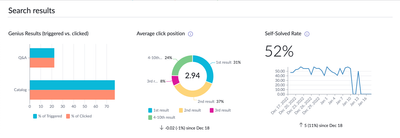
The AI Search Analytics Dashboard, a dashboard available with the Advanced AI Search Management Tools app provides insight into adoption and quality of search as well as what may require tuning and what may be gaps in content.
This article covers the metrics in the context of configuring or tuning AI Search.
Quality

Genius Results Triggered vs. Clicked: Genius Result rendering and frequency they were clicked when rendered. The ‘# of Triggered’ indicates how often a Genius Result was presented to the end user. The ‘% of Clicked’ represents how frequently the Genius Result is clicked when it is rendered. For Q&A Genius Results, because the answer is provided as part of the result, we expect a smaller number of clicks.
Average Click Position: Overall quality can be determined by reviewing the Average Click Position. An average click position of 3 or less performs excellently for most queries.
Self-Solved Rate: This is how frequently users click on a result in the result list. Over 50% is very good, but lower does not necessarily mean poor quality. It could be an indication that the dynamic teaser text or Q&A Genius Result is providing the information the user needs.
Tuning Possibilities and Content Gaps

Top Queries: The most popular queries for the search application. Offers the percentage as well. This helps determine what users are looking for most commonly.
On clicking the ‘View all’ link an additional table is displayed that includes the Average Click Position for all the top queries.

Investigate instances where the average click position is 5 or higher. Oftentimes, administrators discover that either the users’ query term is not prevalent in the title or body of the content. Work with the knowledge manager to adjust the content. As an actionable tuning measure, add that term or phrase to the meta of the content. If there is a pattern or similarity between those terms who have high average click positions, this would be a good opportunity to use Boost Rules*. If there is dense content, i.e., the term laptop has over 10 results, but there is one supported laptop per region, a Promote Rule may be more appropriate.
Queries with No Clicks: The most popular queries that the user abandoned or did not click on any results. These search terms or phrases do not always require improvement; the answer to the query may be present in the result set, as is the case with Q&A Genius Results. There is some further investigation needed into this before direct action can be taken. The recommendation is to test these queries and have a better understanding of why the user may not have clicked on the result.
Queries with No Results: These are the terms used that had no results returned. The experience for the end user is that they are asked to submit a different query. There are several causes to a no result query:
- The user does not have access to the content
- There is a gap of information in the system, a missing Knowledge Base article
- There is information in the system that matches the intent but not the wording.
If the user does not have access to the content, it would be prudent to understand why and if the information is sensitive. If it is not sensitive, it may be worthwhile to adjust access settings on the article. If there is a gap in content or a lack of Knowledge Base article, work with the organization’s Knowledge Manager to determine if this topic should be in the Knowledge Base. If this information exists, but does not match with the wording or terms used by users there are two options:
- Create a synonym for the user’s query that aligns it with the content.
- Notes on synonyms: they carry the same weight and meaning for all queries and content, and they are applied to all queries in the specified language. This is ideal for instances where there are many articles with similar meaning that you would expect users to get to in the same way.
- Add the user’s query terms to the meta** field of the desired content.
- This offers a more precise approach as opposed to synonyms. This is ideal if the term should not be universally applied as a synonym.
*Boosting Results
There may be specific fields/attributes in content that can identify it as more relevant content. For example, the Policies knowledge base is the definitive destination for relevant information in the organization. In that case, you can boost that category.
Navigate to AI Search > Search Experiences > Search Profiles > your_search_profile
Create a new Result Improvement Rule from the appropriately named related list.
- Give it an identifiable Label, something like ‘Boost Policies’ in our example.
- Set the End Date to a time in the distant future.
- Check the 'Activate on all queries” box
- Click the Create Boost Action’ button:

- Give it an identifiable Label, something like ‘Boost Policies’ in our example.
- Set Boost Type to: Boost by Field Match (static)
- Indexed Source: Knowledge Table
- When: kb_knowledge_base
- Contains: Policies
- Boost Weight: 1000

- Click Submit
- Click Update, and Publish
This will now apply a boost to those Policy documents. The Boost Weight can be increased or decreased in increments of 100 for testing purposes.
Some customers may observe that regional or geographic attributes are particularly important for their users. If that is the case, check out Result Improvement Rules for Global Companies.
**A note on meta
The meta field (table.meta) is a legacy field that heavily drove which keywords influenced relevancy for a specific piece of content. AI Search also takes advantage of this field. While this field does not have the impact of the title (‘short description’ for the Knowledge table or ‘name’ for the Catalog Items table) it will still give a greater influence over other fields on the table. This makes it a good candidate for adding phrases that end users are expecting to appear in the article, if the article cannot be rewritten.
For more context on the deploying, monitoring, and improving AI Search check out these articles:
https://www.servicenow.com/community/ai-intelligence-articles/ai-search-tuning-making-ai-search-analytics-actionable/ta-p/2568580