
"Try It" Tool for Database Views
Part of the Developer Toolbox Series.
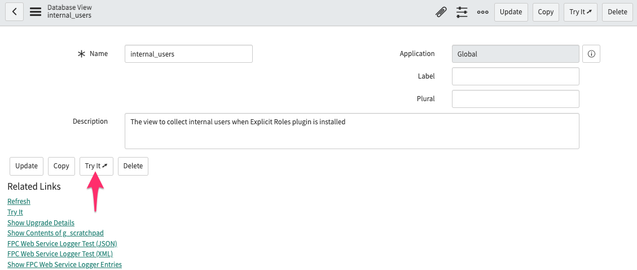
This is a simple addition to the OOTB "Try It" Related Links UI Action. Whereas the OOTB one will validate the View, this one will just try to open it up. I'll leave the validation to SN.

This one will open up the List View in a new tab/window instead of redirecting the current window. This way you can keep working on/tweaking the View and refresh it in the other tab/window.
It will also warn you if there are unsaved changes on the form:

The warning popup requires the "Simple Modal Confirm" UI Page.
This is what the Script field looks like:
//client function that runs 'onclick'
function uFpcTryItDatabaseView() {
    //the form data has been modified but not saved yet
    if (g_form.modified) {
        var message = getMessage("u_fpc_try_it_database_view.modal.message");
        var modalWindow = new GlideModal("u_fpc_modal_simple_confirm");
        try {
            modalWindow.setBackdropStatic(true); //remain open when user clicks outside of the window
        } catch (err) {}
        modalWindow.setWidth(600);
        modalWindow.setTitle(getMessage("u_fpc_try_it_database_view.modal.title"));
        modalWindow.setPreference("sysparm_message", encodeURIComponent(message));

        //set the function we want to run after the OK button is clicked
        modalWindow.setPreference('uFpcOnCloseOk', uFpcTryItDatabaseViewShow.bind(this));

        //show the popup window
        modalWindow.render();

        return;
    }

    //show the item in a new tab/window
    uFpcTryItDatabaseViewShow();

    function uFpcTryItDatabaseViewShow() {
        //open this Database View in a new tab/window
        var gUrl = new GlideURL("nav_to.do"); //build a new GlideURL object
        gUrl.addParam("uri", g_form.getValue("name") + "_list.do");

        //and then display the View in a new tab/window
        g_navigation.open(gUrl.getURL(), "_blank");
    }
}
I've attached XML files for the UI Action and 2 UI Message records so you can just import them into your instance. As always, try it out in your company's development instance first, or better yet, your own personal development instance.
https://www.servicenow.com/community/developer-blog/quot-try-it-quot-tool-for-database-views/ba-p/2535153