
Flow reports not available. Check system property com.snc.process_flow.reporting.level
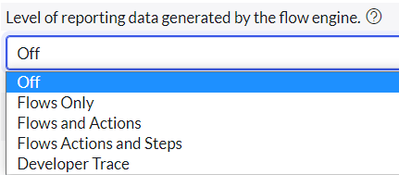


But hold on, do you really want switch on flow reporting on global level for each flow. I mean, ServiceNow would have switched off this functionality for some reason.
Actually, flow reporting generates loads of logs and that can consequently impact your instance performance. Thankfully ServiceNow has provided us with an option to switch on reporting on individual flows.
To switch on reporting on individual flows:
1. Go to your flow
2. Click on three dots on top right
3. Then, click on 'Flow Reporting Settings'

4. Select any options from the 3 options as per your requirement : Flows only, Flows and Actions and ON

Please share your thoughts as well.
Please mark this article if you found it helpful
Cheers,
Hardit Singh
Connect with me on:
https://www.servicenow.com/community/developer-blog/flow-reports-not-available-check-system-property-com-snc-process/ba-p/2543757