
"Field Labels" Relationship/Related List
Part of the Developer Toolbox Series.
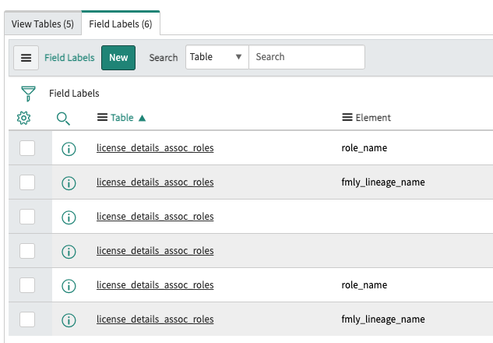
Here's a simple Relationship record so you can add a "Field Labels" Related List to the Database View Form View:

To add it, create a new Relationship record (System Definition \ Relationships) with the following details:
Name: Email Scripts
Applies to table: Database View [sys_db_view]
Queries from table: Field Labels [sys_documentation]
Query with:
(function refineQuery(current, parent) {
    //https://www.servicenow.com/community/user/viewprofilepage/user-id/39660
    //https://www.servicenow.com/community/developer-blog/quot-field-labels-quot-relationship-related-list/ba-p/2535408

    //view all the Field Labels created for a Database View
    //the "Field Labels" Related List must be added to the Database View form

    //add the query to pull in all the Field Labels
    current.addQuery("name", parent.getValue("name"));

})(current, parent);
Once you create the record, add the Related List by right-clicking the form header and selecting "Configure \ Related Lists" menu item and move the "Field Labels" item from the "Available" box over to the "Selected" box and click "Save".
I've attached an XML file for the Relationship record so you can just import it into your instance. As always, try it out in your company's development instance first, or better yet, your own personal development instance.
https://www.servicenow.com/community/developer-blog/quot-field-labels-quot-relationship-related-list/ba-p/2535408