
Change Form Header Background Color
J
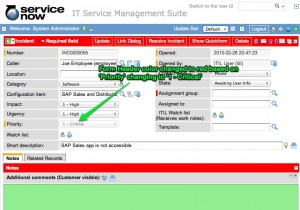
ust a quick scripting tip today based on a solution that I helped someone with on the ServiceNow community site. The request I received was to be able to change the form header background color based on changes to values in a record. You’re probably aware that ServiceNow provides a global CSS property to set the form and list header color. This is usually one of the first things that gets customized during a deployment. The global property can be found by navigating to System Properties -> CSS, and changing the ‘Banner and list caption background color’ property.
This request required something more dynamic so that the color could change based on specific table and record values and specific changes to a specific form. In order to accomplish this, I came up with a simple client script that can be used anywhere you need it.

You can add this script snippet to any client script. Just change the ‘backgroundColor’ variable to the color of your choice!
function onLoad() {
//Change the color of all form section headers
var backgroundColor = 'red';
$$('.header').each(function(elmt) {
elmt.style.backgroundColor = backgroundColor;
});
}
This entry was posted on Wednesday, January 11th, 2012 at 10:35 am and is filed under Client scripts. You can follow any responses to this entry through the RSS 2.0 feed. You can skip to the end and leave a response. Pinging is currently not allowed.
https://web.archive.org/web/20121109062626/http://www.servicenowguru.com/scripting/client-scripts-scripting/change-form-header-background-color/