
Show a Task Workflow Timeline
Wednesday, 16 May, 2012 05:04 Written by Mark Stanger
H
aving a blast from Knowledge 12 this week! It’s been fun this year being able to relax a little bit more and take some more time to talk with people. I look forward to meeting more of you over the next couple of days.
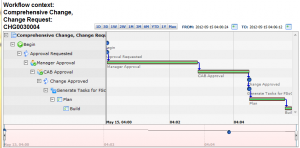
Today, I’m writing in response to a user on the ServiceNow community, and a few users in the advanced admin course I was observing earlier in the week. In the advanced admin class, they show how you can click a UI action on the change form to show a workflow in progress. They also show you how you can view a timeline for a workflow context. These UI actions (and corresponding popups) can provide valuable information to both administrators and technicians to determine the status and process of a particular workflow. The only problem (in the case of the timeline) is that it can’t be accessed from the change directly. You have to navigate to the workflow context record first.
In this post I’ll show you how to create a UI action script to display a workflow timeline popup directly from any task form in the system.

If you’re familiar with the default UI action in the system, the code below should look familiar. It is initiated from the client, gets the sys_id of the workflow context, constructs a URL to the timeline, and then pops a new window up showing the timeline. The real trick in this case is getting the correct sys_id from the workflow context record. You should be able to create the following as a UI action on your task table. It will display for any itil user on a task that has an associated workflow.
‘Show Workflow Timeline’ UI Action
Name: Show Workflow Timeline
Table: Task
Order: 200
Show Insert: False
Client: True
OnClick: showTimeline();
Form link: True
Condition: !current.isNewRecord() && (new Workflow().hasWorkflow(current)) && gs.hasRole(‘itil’)
Script:
function showTimeline() {
var wf = new GlideRecord('wf_context');
wf.addQuery('id', g_form.getUniqueValue());
wf.query();
if(wf.next()){
var url = new GlideURL('show_schedule_page.do');
url.addParam('sysparm_stack', 'no');
url.addParam('sysparm_page_schedule_type', 'workflow_context');
url.addParam('sysparm_timeline_history', wf.sys_id);
var w = getTopWindow();
w.popupOpenFocus(url.getURL(), 'show_workflow_timeline', 950, 700, '', false, false);
}
}
https://web.archive.org/web/20121109062552/http://www.servicenowguru.com/system-ui/ui-actions-system-ui/show-task-workflow-timeline/