
‘Add Me’ UI macro for User and Group Fields
Friday, 23 March, 2012 09:20 Written by Mark Stanger
T
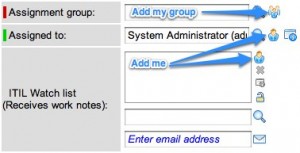
his post comes in response to a question I saw this morning on the ServiceNow forum. The request was to be able to create ‘Add me’ icons for user and group fields that would act the same way as the ‘Add me’ field on list fields. This post shows you how!

This functionality can be created for both user and group fields by adding a UI macro and associating it to the field in question. UI macros are defined by navigating to ‘System UI -> UI macros’ in your left nav.
‘Add me’ UI macro for user fields
‘add me’ UI macro
Name: add_me
XML:
<?xml version="1.0" encoding="utf-8" ?>
function addMe(reference) { //Get the user reference field and populate the current user var s = reference.split('.'); var referenceField = s[1]; g_form.setValue(referenceField, '$[gs.getUserID()]'); }
</j:jelly>
–Once you’ve created the macro you need to invoke it on your user field by adding the ‘ref_contributions=add_me’ attribute to the dictionary of the user field.
‘Add my group’ UI macro for group fields
The group scenario is a bit more complicated because there’s not a built-in system concept of a primary group. Since each user can be a member of multiple groups you’ll need to decide how to deal with this in your environment. I think if I was setting it up, I’d put a ‘Primary’ field on the ‘sys_user_grmember’ table. This field could be modified by list editing the ‘Groups’ related list on the user form.
For this example, I’ve just set up the code so that it looks at the group membership table. If the user is a member of one group then that group will be populated. Otherwise, an alert appears indicating that a primary group doesn’t exist. You can adjust the ‘addMyGroup’ function below to meet your specific needs.
‘add_my_group’ UI macro
Name: add_my_group
XML:
<?xml version="1.0" encoding="utf-8" ?>
function addMyGroup(reference) { //Get the group reference field and populate the first group queried var s = reference.split('.'); var referenceField = s[1]; var grpRec = new GlideRecord('sys_user_grmember'); grpRec.addQuery('user', '$[gs.getUserID()]'); grpRec.query(groupCallback); //After the server returns the query recordset, continue here function groupCallback(grpRec){ //Check to see if the user is a member of a single group if(grpRec.next()){ if(grpRec.rows.length == 1){ //Populate for a single group g_form.setValue(referenceField, grpRec.group); } else{ alert('No primary group defined.'); } } else{ alert('You are not a member of any groups.'); } } }
</j:jelly>
–Once you’ve created the macro you need to invoke it on your group field by adding the ‘ref_contributions=add_my_group’ attribute to the dictionary of the group field.
https://web.archive.org/web/20120531021130/http://www.servicenowguru.com/system-ui/ui-macros/add-me-ui-macro-user-group-fields/