
Service Account Management, Part XIX
“There are no big problems, there are just a lot of little problems.”
— Henry Ford
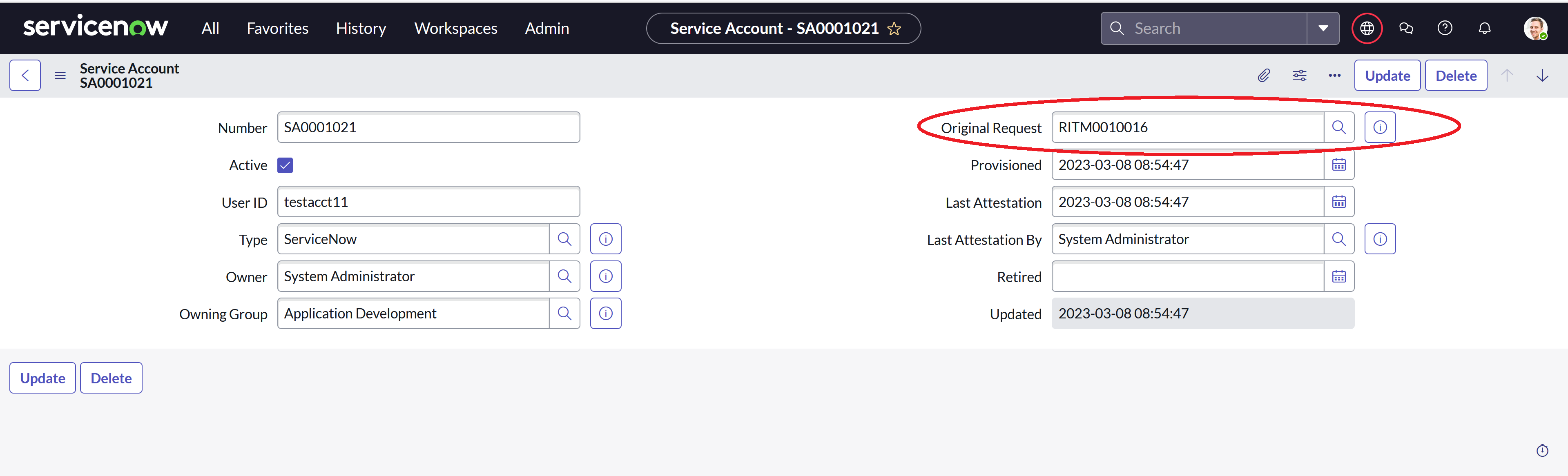
Last time, we wrapped up the initial table configuration for our Service Account dashboard and tested everything out to make sure that it all worked as intended. We also identified the fact that we need to add a second table to the configuration so that we can see the pending requests that have not yet created a record in the Service Account table.Before we do that, though, I decided that it would be useful to add a link to the original request on the Service Account record so that you could easily pull up the request from the account record.

New Original Request field on the Service Account table
To populate the field during the creation of the Service Account record, I pulled the Service Account Request Fulfillment flow up in the App Engine Studio and added an entry to drag in the data pill from the original request in the trigger.

Populating the new Original Request field during record creation
With that out of the way, we can return our attention to adding the new table to the dashboard configuration. To do that, we go back to the Content Selector Configuration Editor that we recently updated to correct a few issues related to Scoped Applications. Before we do that, though, let’s pull up the list of Requested Items and build ourselves a filter that we can use to show all of the open items for Service Accounts requested by the current operator.

List filter for open Service Account items requested by the current operator
We are looking for active items requesting the Service Account catalog item requested by the currently logged on user. The filter can be found in the URL under the sysparm_query parameter.
active%253Dtrue%255Ecat_item%253D55cc38eb970711100362bfb6f053afa8%255Erequest.requested_forDYNAMIC90d1921e5f510100a9ad2572f2b477fe
Of course, we have to do a few change alls to get rid of all of the double encoding present in this version, but once we do that we will have a workable filter for the pending state on our newly added table.
active=truecat_item=55cc38eb970711100362bfb6f053afa8request.requested_forDYNAMIC90d1921e5f510100a9ad2572f2b477fe
Now let’s jump into the editor and add our new table.

Adding the sc_req_item table to the configuration
For now, let’s assume that we don’t want anything to appear in the Active and Retired states, and we can use the same technique that we used on the original table when we didn’t want anything to appear for that table in the Pending state. We’ll set the field list to simply number, and set the filter to number=0.

Setting the fields and filter for the Active state
For the Pending state, we add a few more relevant fields and use the filter we snagged from the list URL earlier.

Setting the fields and filter for the Pending state
We can do a little more with this, but let’s save what we have for now and take it out for a spin, just to make sure that everything is still in working order. Saving the changes should take us to the generated script, which now looks like this.
var ServiceAccountDashboardConfig = Class.create();
ServiceAccountDashboardConfig.prototype = Object.extendsObject(global.ContentSelectorConfig, {
initialize: function() {
},
perspective: [{
    name: 'requester',
    label: 'Requester',
    roles: ''
},{
    name: 'fulfiller',
    label: 'Fulfiller',
    roles: 'itil'
}],

state: [{
    name: 'active',
    label: 'Active'
},{
    name: 'retired',
    label: 'Retired'
},{
    name: 'pending',
    label: 'Pending'
}],

table: {
    requester: [{
        name: 'x_660634_service_0_service_account',
        displayName: 'Service Account',
        active: {
            filter: 'active=true^ownerDYNAMIC90d1921e5f510100a9ad2572f2b477fe^ORowning_groupDYNAMICd6435e965f510100a9ad2572f2b47744',
            fields: 'number,type,user_id,owner,owning_group',
            svcarray: [],
            aggarray: [],
            btnarray: [],
            refmap: {
                sys_user: 'user_profile'
            },
            actarray: []
        },
        retired: {
            filter: 'active=false^ownerDYNAMIC90d1921e5f510100a9ad2572f2b477fe^ORowning_groupDYNAMICd6435e965f510100a9ad2572f2b47744',
            fields: 'number,type,user_id,owner,owning_group',
            svcarray: [],
            aggarray: [],
            btnarray: [],
            refmap: {
                sys_user: 'user_profile'
            },
            actarray: []
        },
        pending: {
            filter: 'number=0',
            fields: 'number',
            svcarray: [],
            aggarray: [],
            btnarray: [],
            refmap: {},
            actarray: []
        }
    },{
        name: 'sc_req_item',
        displayName: 'Requested Item',
        active: {
            filter: 'number=0',
            fields: 'number',
            svcarray: [],
            aggarray: [],
            btnarray: [],
            refmap: {},
            actarray: []
        },
        retired: {
            filter: 'number=0',
            fields: 'number',
            svcarray: [],
            aggarray: [],
            btnarray: [],
            refmap: {},
            actarray: []
        },
        pending: {
            filter: 'active=true^request.requested_forDYNAMIC90d1921e5f510100a9ad2572f2b477fe^cat_item=55cc38eb970711100362bfb6f053afa8',
            fields: 'number,opened,request.requested_for,stage',
            svcarray: [],
            aggarray: [],
            btnarray: [],
            refmap: {
                sys_user: 'user_profile'
            },
            actarray: []
        }
    }],
    fulfiller: [{
        name: 'x_660634_service_0_service_account',
        displayName: 'Service Account',
        active: {
            filter: 'active=true^type.fulfillment_groupDYNAMICd6435e965f510100a9ad2572f2b47744',
            fields: 'number,type,user_id,owner,owning_group',
            svcarray: [],
            aggarray: [],
            btnarray: [],
            refmap: {
                sys_user: 'user_profile'
            },
            actarray: []
        },
        retired: {
            filter: 'active=false^type.fulfillment_groupDYNAMICd6435e965f510100a9ad2572f2b47744',
            fields: 'number,type,user_id,owner,owning_group',
            svcarray: [],
            aggarray: [],
            btnarray: [],
            refmap: {
                sys_user: 'user_profile'
            },
            actarray: []
        },
        pending: {
            filter: 'number=0',
            fields: 'number',
            svcarray: [],
            aggarray: [],
            btnarray: [],
            refmap: {},
            actarray: []
        }
    }]
},

type: 'ServiceAccountDashboardConfig'
});
Now all we need to do is to pull up the dashboard with the modified configuration, click on the Pending state, and take a quick peek.

First test of the new configuration
Well, that’s not too bad. Looks like we screwed up on the field name for the open date, but other than that, things look pretty good. I want to add a few more columns from the catalog item variables anyway, which we can do by configuring some Scripted Value Columns, so let’s fix our little error and deal with those new fields in our next installment.
https://snhackery.com/2023/03/31/service-account-management-part-xix/#utm_source=rss&utm_medium=rss&utm_campaign=service-account-management-part-xix