
ServiceNow Introduction to GlideForm API ==> ServiceNow JavaScript Challenge Day 2
Import
·
Mar 23, 2023
·
article
Hi There,
I hope you're doing great.
With the participation in the ServiceNow Javascripting Challenge led by @Gagan Jolly , I m learning a lot. I thought I should share my learning on the Now community also
Day 2: ServiceNow Java scripting Challange
Statement of Work :
Write a code using the following methods
- clearAllFormMessages
- clearMessages
- clearOptions
- clearValue
- disableAttachments
- enableAttachments
- flash
Solution :
Let's first try to understand what ServiceNow GlideForm API means
GlideForm :
- The GlideForm API provides methods to customize forms.
- Works on the client side only
Lets look into diffrent GlideForm Methods :
- clearAllFormMessages
- Removes all form messages of any type.
- Method Signature : clearAllFormMessages()
- Input parameters :
- Returns :
- Removes all form messages of any type.
- clearMessages:
- Removes all informational and error messages from the top of the form.
- Method Signature: clearMessages()
- Input parameters :
- Returns :
- Removes all informational and error messages from the top of the form.
- clearOptions :
- Removes all options from the choice list.
- Method Signature : clearOptions(String fieldName)
- Input Parameters :
- fieldName ==> String ==> Name of the field.
- fieldName ==> String ==> Name of the field.
- Returns :
- Removes all options from the choice list.
- clearValue:
- Removes any value(s) from the field.
- Method Signature : clearValue(String fieldName)
- Input parameters :
- fieldName ==> String ==> Name of the field.
- fieldName ==> String ==> Name of the field.
- Returns :
- void ==> Method does not return a value
- Removes any value(s) from the field.
- disableAttachments:
- Prevents file attachments from being added.
- Method not available for mobile
- Method Signature: disableAttachments()
- Parameters :
- fieldName ==> String ==> The field name.
- choiceValue ==> String ==> The value stored in the database.
- choiceLabel ==> String ==> The value displayed.
- choiceIndex ==> Number ==> Order of the choice in the list. The index is into a zero based array.
- fieldName ==> String ==> The field name.
- Returns :
- Prevents file attachments from being added.

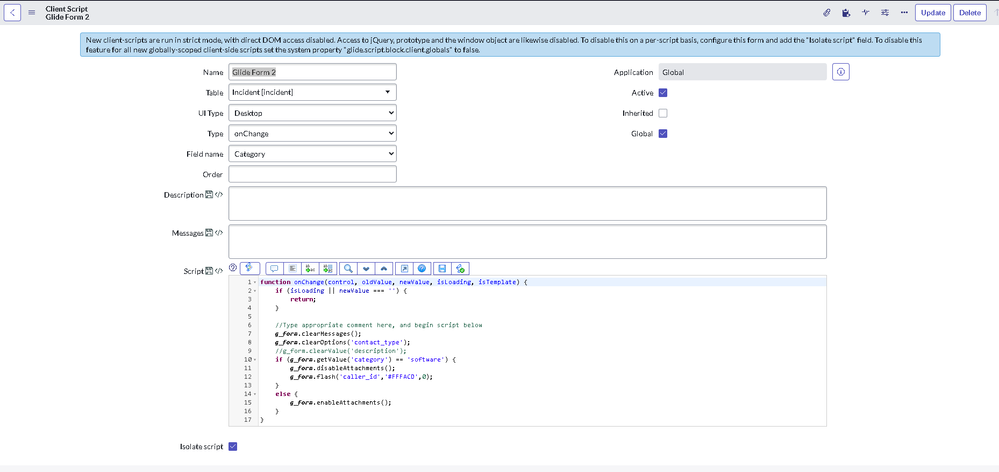
function onChange(control, oldValue, newValue, isLoading, isTemplate) {
    if (isLoading || newValue === '') {
        return;
    }

    //Type appropriate comment here, and begin script below
    g_form.clearMessages();
    g_form.clearOptions('contact_type');
    //g_form.clearValue('description');
    if (g_form.getValue('category') == 'software') {
        g_form.disableAttachments();
        g_form.flash('caller_id','#FFFACD',0);
    }
    else {
        g_form.enableAttachments();
    }
}
Please be sure to bookmark this article and mark it as Helpful if you thought it helpful.
Regards,
Amit Gujarathi
View original source
https://www.servicenow.com/community/developer-articles/servicenow-introduction-to-glideform-api-gt-servicenow/ta-p/2387510