
Manage Software Technology Standards with APM's Technology Reference Model (TRM)
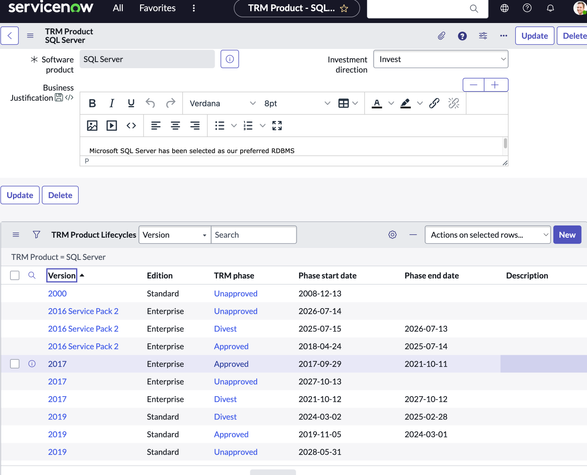
The Technology Reference Model (TRM) feature of Application Portfolio Management (Tokyo+) allows practitioners to define the Software Technology Standards for their enterprise. For many reasons including risk as well as cost management, the technologies used within the enterprise must be governed. The software products governed could be enterprise software such as database and middleware or end user computing such as mail clients or messaging and collaboration desktop tools. See the Product Documentation here…
Watch the video of our workshop presentation on Technology Reference Model:
Establishing Your Technology Reference Model
Key Concepts
TRM allows those governing the technologies to define expressions of how particular software is to be used as opposed to the support lifecycle we find in TPM. These expressions are called TRM Lifecycles and a lifecycle is made up of a series of phases which include a declaration of approval for usage (Approved, Approved with Constraints, Migrate, Eliminate, and Prohibited are all examples you might see) and a start and end dates. We define the standards at the Product level. Once we have determined a particular product is approved, we then define version specific usage lifecycles to guide the users of the product in question.
- TRM Product – a Software Product along with its version specific lifecycles
- Business Justification – the business case for the software
- Investment direction - a statement of how the enterprise is investing in this product: Invest, Maintain, Divest, Eliminate
- Category – Category should be the technical function of the software such as Email Client, RDBMS, No-SQL Database, Web Server etc.
- Business Justification – the business case for the software
- TRM Product Lifecycle – a single, version specific and dated phase (Approved, Divest, Unapproved, etc.)
- Start date – the date the phase begins
- End date – date the phase ends or blank if continues forever (used for Unapproved)
- Phase – phase terms are configurable by the customer
- Version, Edition – the specific version and edition
- Start date – the date the phase begins
- TRM Category – the categories are configurable. Examples of categories you might see are:
- UNSPSC – unspsc.org documents the UN Standard Products and Service Codes
- The Federal Enterprise Architecture (FEA) Technical Reference Model – the technical reference model published as part of the FEA standards.
- See attached example categories: Example-TRM-Categories.xlsx
- UNSPSC – unspsc.org documents the UN Standard Products and Service Codes
- Technical Debt – calculated records indicating unapproved usage of Software
- TRM Requests – these allow users (apm_user) to request new products and/or a new version lifecycle phase
For example, our preferred Relational Database Management System (RDBMS) might be Microsoft SQL Server. Each version as it becomes available and is specified for use in the organization has a set of lifecycles defined for Approved which is the period in which the particular version is allowed in production, then Divest which is the period when the version should be upgraded and finally Unapproved which is the period (probably until end of time) that the product version is no longer allowed.

Configure your TRM Phases
Out of the box we provide the following phase definitions:
- Evaluation – not approved for Production. Intended for situation where the software os under consideration for use; perhaps in a proof of concept
- Approved – approved for use in production
- Approved with Constraints – approved for use in product provided the specified constraints are met.
- Divest – the product is being removed from the organization and is not approved for use in production. All instances should have migration plans to an approved product. Installs will be flagged as technical debt.
- Unapproved – not allowed in the organization, period. Any installs will be flagged as technical debt.
There are many other phase schemes. For example, we have seen these:
- Emerging
- Mainstream
- Restricted
- Retiring
- Prohibited
The concepts are similar. The main point is to use your organization's definitions!
Determining Version lifecycles based on Support Lifecycles
The Publisher support lifecycles from your SAM Pro content subscription or other sources can be utilized to define the TRM lifecycles.
An example process is as follows:
- Prior to the Publisher General Availability (GA) date and up until GA date + a short period past, the product is marked as Evaluation
- Approved or perhaps Approved with Constraints is defined starting 3-6 months after GA to allow the new version to “settle” a bit. The End date for this approved version is 12-18 months prior to the Publisher’s End of Support (EOS) date.
- Some companies have a N-1 rule on version and only allow the previous version from the latest. This ensures the version has had time to stabilize.
- 12-18 months prior to End of Support, the Divest phase begins. This becomes a driver for IT owner to form and budget upgrade plans (create a Demand!)
- On End of support (EOS) or if your company allows for extended support (EOES) the Unapproved phase begins. Since the product version will always be Unapproved thereafter, no end date is specified.
The scheme above is just one of many possibilities. The point is you probably do not want to match the Support dates but set your usage “inside” the support dates for added risk reduction.
Establishing your Technology Reference Model
Your TRM can of course be maintained. As an Enterprise Architect or Technology Governance board member, you would use the form views in the Application Portfolio Management > Technology Portfolio Management > Product etc. to define products, lifecycles and so forth. The process in general is:
- Configure the TRM Phases to match the terms your organization utilizes to define allowed software usage.
- Configure / Load the TRM Categories. Note that multiple levels are supported. See the attachments to this article for examples.
- Define the TRM Products
- If the Publisher does not exist in the Company table, work with your ServiceNow Platform team to add the missing Publisher.
- If the Product does not exist:
- If you have Software Asset Management Pro, then your Software products are provided by the SAM Pro content library and you will need to work with your SAM team to define the new Software Product(s). This may be done via new Content update requests.
- If you are not a SAM Pro subscriber, then likely you will need to populate the new Software Product(s) manually
- If you have Software Asset Management Pro, then your Software products are provided by the SAM Pro content library and you will need to work with your SAM team to define the new Software Product(s). This may be done via new Content update requests.
- Select the appropriate Category, Product Phase, Investment direction and specify the Business Justification.
- If the Publisher does not exist in the Company table, work with your ServiceNow Platform team to add the missing Publisher.
- Define the Version specific lifecycle phases for the TRM Product. See discussion above.
- Once the TRM is established, use the power of the platform to define workflows and other such means to govern catalog items, fulfillments, technical service offerings and other such activities based upon the TRM definitions.
Question: We have Software Asset Management Pro, can we “import” the TRM definitions?
Most certainly you can do so. For example, you might write a script that does something like the following:
- For each Software Mode with entitlements, create a matching TRM Product using the information on the Software Model.
- For each version of said Software Model (evaluate the Software product Lifecycles if the Software Model is non-version specific)
- If the GA date is within 5 years, add an Approved TRM Lifecycle starting 6 months after the GA date.
1. For the same version, locate the End of Support, End of Extended Support and if available, End of Life dates.
Create Divest and Unapproved lifecycles that for the version
2. The End date of the Approved phase should be 1 day prior to the Start date of the Divest of Unapproved phase
3. The final phase in the lifecycle chain should have its end date left blank as that phase never ends (always Unapproved from the start date on) - Repeat for all Software models
- If the GA date is within 5 years, add an Approved TRM Lifecycle starting 6 months after the GA date.
- For each version of said Software Model (evaluate the Software product Lifecycles if the Software Model is non-version specific)
Note: some caution and logic will be needed when deriving the TRM lifecycles as the SAM Pro Software Product Lifecycles may cover the same version over and over due to differences in the build number, also known as Full Version.
Question: Should we specify particular software that is deemed unapproved?
It will depend upon the process that you want to undertake. You certainly do not want to have a TRM Product for every possible Software product! A hybrid approach would be that if a Product is requested AND it is rejected, then the TRM Product is created with one non-versioned lifecycle phase that goes on forever and both the TRM Product and the TRM Lifecycle are set to Unapproved. This is a means to discourage further requests of the product which for whatever reason has been declared unapproved.
Question: Once established, how might the TRM be utilized?
Once you have established your Technical Reference Model and the processes to maintain it, the attached big picture TRM Process is an example of how TRM is incorporated into processes from Asset Management, Procurement and Fulfillment via Technical Services and offerings.
Note: download and open the TRM Big Picture Process.pdf below as the diagram is far too large for this community page to show in a readable form.

Question: Once we establish our TRM, how do we identify Technical Debt?
The answer is very easy, just configure the TRM Technical Debt evaluation job: Populate TRM Technical debt for production applications which can be found in the System Scheduled Jobs. the Technical Debt job examines the Software technologies associated to Application Service in TPM and evaluates the version against the TRM Products and versions. If a Software Technology is used that is not Approved in the TRM, a Technical Debt record is created against the offending Business Application. From this foundation, workflows and other such process may be derived to remediate the technical risk.
Question: Do the TRM Lifecycles match the Software Product Publisher Support lifecycles?
The short answer is no they should not. The support lifecycles should "inform" you as to how to set the TRM lifecycle but Usage as opposed to Support should not be the same for practical risk management reasons.
Hope this helps. Happy APMing...
Mark

https://www.servicenow.com/community/apm-articles/manage-software-technology-standards-with-apm-s-technology/ta-p/2478072