
Client Script Types
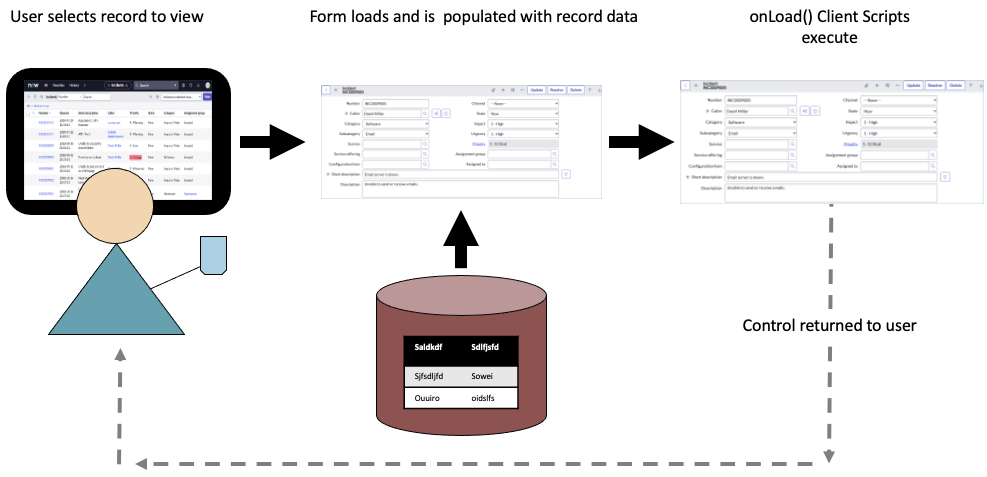
A Client Script executes client-side script logic when forms are:
onLoad
onLoad Client Scripts execute script logic when forms are loaded. Use onLoad Client Scripts to manipulate a form’s appearance or content. For example, setting field or form-level messages based on the presence of a value. Use onLoad Client Scripts sparingly as they impact form load times.
onChange
onChange Client Scripts execute script logic when a particular field’s value changes. Use onChange Client Scripts to respond to field values of interest and to modify another field’s value or attributes. For example, if the State field’s value changes to Closed Complete, generate an alert and make the Description field mandatory.
onSubmit
onSubmit Client Scripts execute script logic when a form is submitted. Use onSubmit Client Scripts to validate field values. For example, if a user submits a Priority 1 record, the script can generate a confirmation dialog notifying the user that the executive staff is copied on all Priority 1 requests.
NOTE: The Type field has a fourth option: onCellEdit. The onCellEdit Client Script type is for lists rather than forms. onCellEdit Client Scripts are not addressed in this learning module.
https://medium.com/@LearnITbyPrashant/client-script-types-6ed9de2f9f3c?source=rss-d005fc598f0a------2