
The Script Field in Client
When the type value is set, a script template is automatically inserted into the Script field.
onLoad Script Template
The onLoad script template:
The onLoad function has no arguments passed to it. As indicated by the comment, add your script logic in the onLoad function. It is a best practice to document your code so include comments to explain what the script does. Your future self will thank you for the clearly documented script.
This example script generates an alert when a user requests a form load for a record. The user cannot interact with a form until onLoad Client Scripts completes execution.
onSubmit Script Template
The onSubmit script template:
The onSubmit function has no arguments passed to it. As indicated by the comment, add your script logic in the onSubmit function.
This example script generates an alert when a user saves a NeedIt record. The record is not submitted to the server until the onSubmit Client Scripts completes execution and returns true.
onChange Script Template
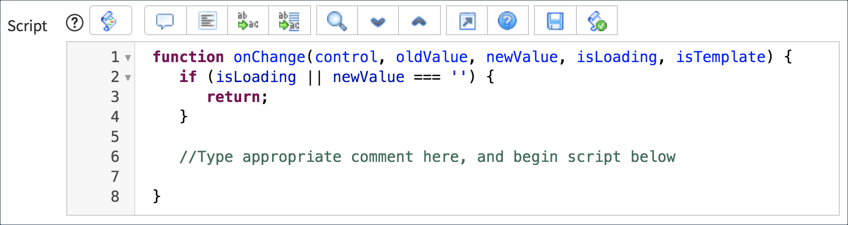
The onChange Script template:
The onChange function is automatically passed five parameters by ServiceNow. Although you do not need to do anything to pass the parameters, you can use them in your script.
- control: field the Client Script is configured for.
- oldValue: the value of the field when the form is loaded and prior to the change.
- newValue: the value of the field after the change.
- isLoading: boolean value indicating whether the change is occurring as part of a form load. Value is true if the change is due to a form load. When forms load, all the field values on the form change as the record is loaded into the form.
- isTemplate: boolean value indicating whether the change occurred due to the population of the field by a template. Value is true if the change is due to population from a template.
When a user selects a record to load, the form and form layout is rendered first and then the fields are populated with values from the database. From the technical perspective, all field values are changed, from nothing to the record’s values, when a form loads. The if statement in the template assumes that onChange Client scripts should not execute their script logic when a form loads. The onChange Client Script also stops execution if the newValue for a field is no value. Depending on your use case, you can modify or even remove the if statement. For example:
//Stop script execution if the field value change was caused by a Template
if(isLoading || newValue === '' || isTemplate) {
return;
}
For this example, the onChange Client Script executes because of changes to the Short description field value:
When a user changes the value of the Short description field on the form the onChange script logic executes. The example generates an alert stating that the value of the Short description field has changed from the value the field had when the form loaded to the new value on the form.
The value of the Short description field has changed only on the form. Changes are not sent to the database until a user saves, updates, or submits the record.
It is important to know that the value of oldValue is set when the form loads. Regardless of how many times the value of the Short description field changes, oldValue remains the same until the form is re-loaded from the database.
Form loads:
oldValue = hello
newValue has no value
User changes the value in the Short description field to bye:
oldValue = hello
newValue = bye
User changes the value in the Short description field to greetings:
oldValue = hello
newValue = greetings
The user saves the form and reloads the form page:
oldValue = greetings
newValue has no value
https://medium.com/@LearnITbyPrashant/the-script-field-in-client-a4caf18376c8?source=rss-d005fc598f0a------2