
Parallel Approvals in Flow Designer
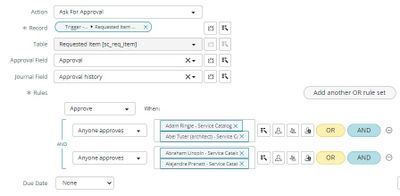
Parallel approvals have been a very common thing in the world of workflows. Today, if you try to configure the same in a flow designer, you might face a lot of issues in setting it up within a flow. Yes, You are hearing it right! Parallel approvals does not work in the flow designer and you could read several posts/workarounds in the community regarding the topic.
As it happened, I had to implement a similar requirement and had chance to explore all possible workarounds and I am sharing my experiences around it in the blog. Searching across community, you could find several different approaches around parallel approvals. A lot of them talk about using the Ask for Approval action and to setup multiple approvals rules of type ‘Anyone approves’ or ‘# of users approve’. This configuration does work if you have a single approver listed in the data pill but fails badly if you have more than one approver and you try to reject or approve the request.

My scenario was a very dynamic use case with multiple approvers and I was not able to use this option. Another common approach discussed was around calling workflows within a flow as a solution. This work properly as the execution of parallel approvals were taken care by workflows. I was again unable to use this approach as it defeats the whole purpose of migrating towards flow which was a primary goal of my requirement.
There are also posts mentioning about using the ‘Do the following in parallel’ flow logic but this option is straightaway not working in the platform.

I had multiple incidents opened with ServiceNow support and understood this to be an issue with the original design of flows and it would require a major change to fix it permanently. Based on my understanding, flow engine treats an approval record to be tied to a single task record and whenever you approve/reject it, the entire set of approvals associated with the task are considered to be no longer required and ignored. Originally this was supposed to be fixed in Tokyo but further incidents with support has revealed that it may get delayed to either in Utah or later release.
Before I end, there is still a workaround that could be used for unavoidable cases which does take care of the highlighted issues but it has certain drawbacks as well. You will need to create a temporary task record and then associate it to the approval. Each parallel approval should be tied to a separate task within ‘Do the following in parallel’ flow logic and then requested for approval. This will ensure that approvals are tagged to different task records and it work parallelly as expected. Of course, you will have to manage the drawbacks of dealing with the temporary task closure and also around the approval visibility on the request. This is not a recommended approach but a workaround provided by ServiceNow until the actual issue is fixed.

https://www.servicenow.com/community/developer-articles/parallel-approvals-in-flow-designer/ta-p/2421889