
How to Use Multirow Variable Sets (MRVS) in Flow Designer
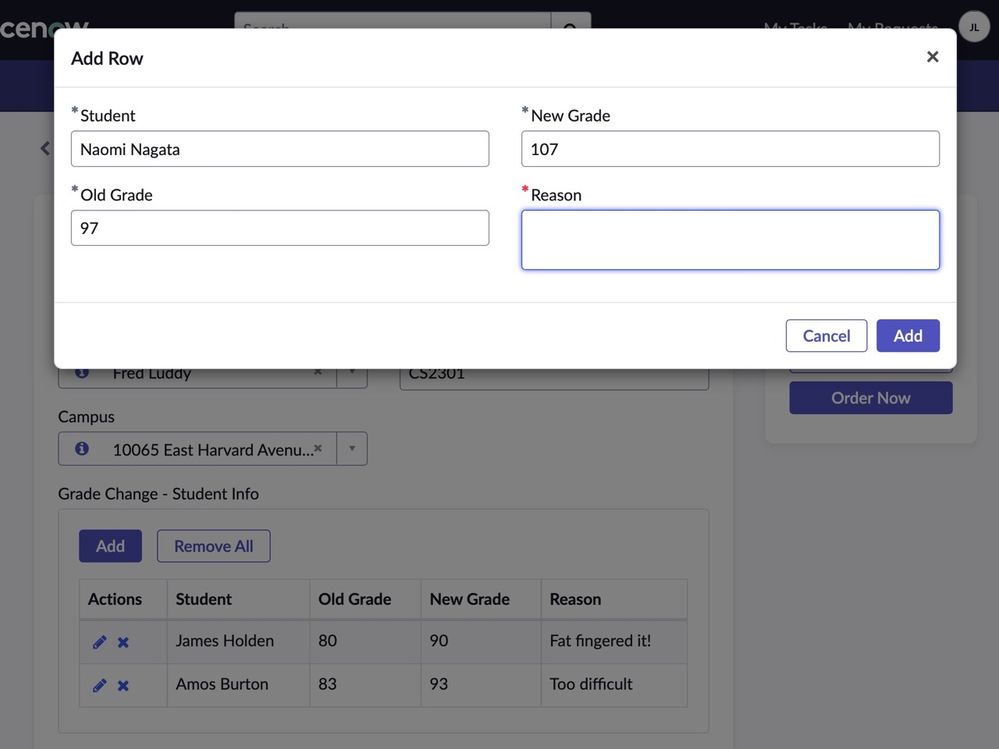
The ServiceNow Service Catalog Multirow Variable Set (MRVS) is a handy way to enter multiple rows as part of a Service Catalog request. In this example a professor at a college wishes to make a request to change the grades of several students in a class and can enter the header information and then enter a row for each student with different values.
Like this!

Once you've created your catalog item and attached a new flow with a Catalog Item trigger you need to process each of those rows. You do that with the Flow Designer action called "Get Catalog Variables". This action allows you choose the main catalog item and select the variables which you wish to use in your flow.
As you can see the standard non-MRVS variable sets have their values surfaced directly (in this case "campus", "instructor" and "course") but the MRVS variable set called Grade Change Student Info is returned as a JSON array.

1. Add the "Get Catalog Request Variables" step and choose Trigger > Requested Item for the Submitted Request and your main Catalog Item for the template. (See above).
2. Select all variables and move them to the right hand "Selected" panel.
3. Add a "Flow Logic > For Each" step to loop the variable set array and select the variable "Grade Change Student Info" from the previous step like this:

4. You may now use the outputs from the for each to perform an action on each, and combine the values with the header values. You even have access to the variable values with the pill picker. For demonstration purposes I am logging the values like this:

That's it. Good luck!
https://www.servicenow.com/community/workflow-automation-articles/how-to-use-multirow-variable-sets-mrvs-in-flow-designer/ta-p/2406608